
Branding and themes
Branding in Northplane is the look of the console for this installation: one colour theme and one light/dark mode, chosen by an administrator and seen by everyone who signs in. It is deliberately not per user and not per tenant. There is no logo, name or CSS upload.
What can be branded
Section titled “What can be branded”| Axis | Values | Default |
|---|---|---|
Colour theme (theme) |
One of the 31 theme ids below (<html data-theme="…">) |
obsidianFire (“Obsidian & Fire”) for a browser with no cached choice |
Mode (mode) |
dark, light, system (system follows the operating-system preference live via prefers-color-scheme) |
dark |
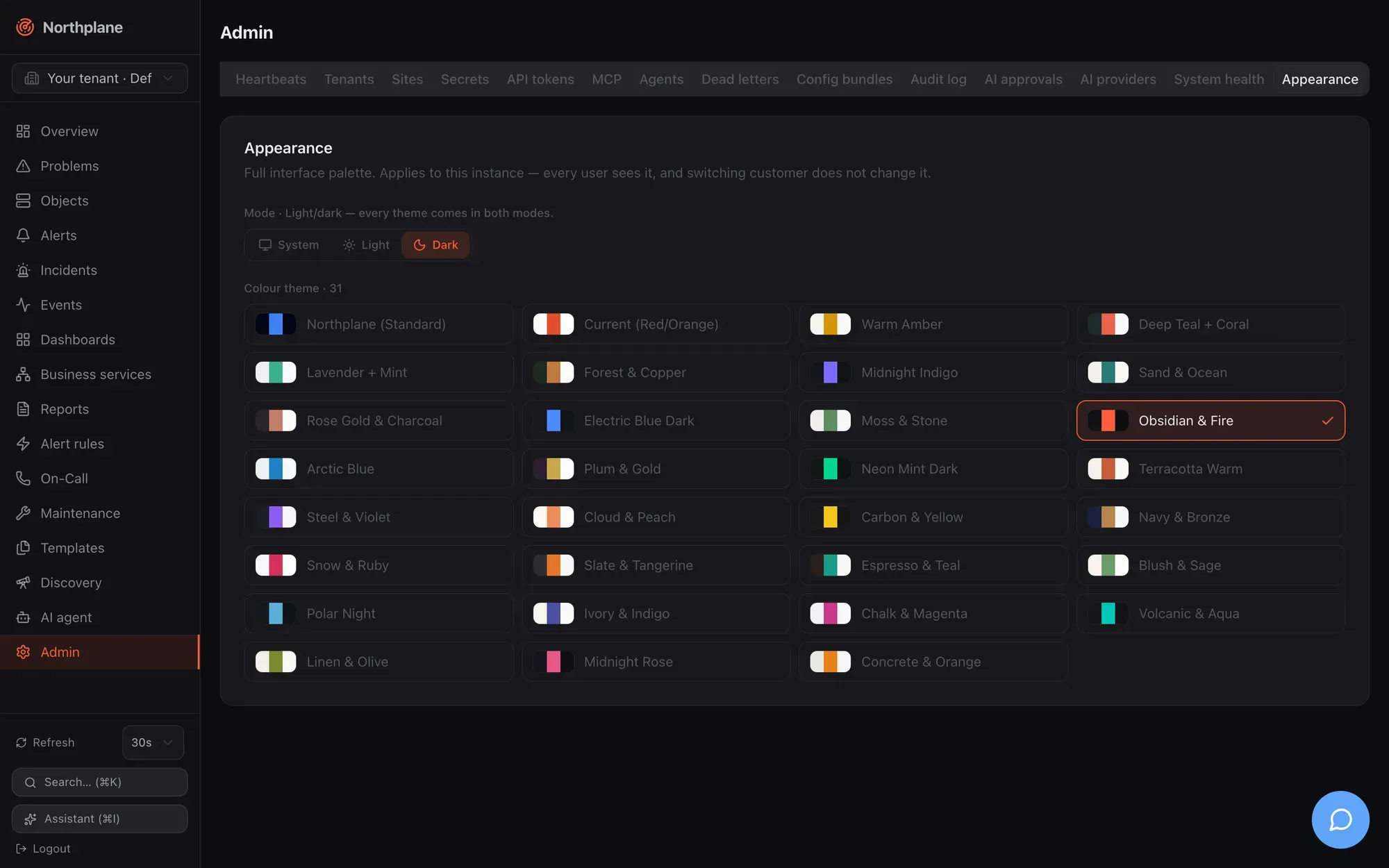
Every theme exists in both modes (30 dark and 30 light CSS blocks plus the built-in northplane palette on :root). The sidebar logo, the tenant-switcher chip and the favicon are tinted with the active theme’s accent.
Set the instance appearance
Section titled “Set the instance appearance”Open Admin → Appearance (Darstellung). The card shows a Mode row (System / Hell / Dunkel — “Light/dark — every theme comes in both modes”) and a Farbschema / Colour theme radio grid with a swatch and label per theme. Picking a value applies it in your browser immediately and writes it to the server as the instance branding.
The controls are enabled only for principals whose permissions imply config:write (the built-in admin role; operator and viewer see a read-only banner: “Only administrators with config:write can change this instance’s appearance”). The hint under the title states the scope: “Applies to this instance — every user sees it, and switching customer does not change it.”
Themes
Section titled “Themes”| Id | Label | Id | Label |
|---|---|---|---|
northplane |
Northplane (Standard) | terracotta |
Terracotta Warm |
currentRed |
Current (Red/Orange) | steelViolet |
Steel & Violet |
warmAmber |
Warm Amber | cloudPeach |
Cloud & Peach |
deepTeal |
Deep Teal + Coral | carbonYellow |
Carbon & Yellow |
lavenderMint |
Lavender + Mint | navyBronze |
Navy & Bronze |
forest |
Forest & Copper | snowRuby |
Snow & Ruby |
midnightIndigo |
Midnight Indigo | slateTangerine |
Slate & Tangerine |
sandOcean |
Sand & Ocean | espressoTeal |
Espresso & Teal |
roseGold |
Rose Gold & Charcoal | blushSage |
Blush & Sage |
electricDark |
Electric Blue Dark | polarNight |
Polar Night |
mossStone |
Moss & Stone | ivoryIndigo |
Ivory & Indigo |
obsidianFire |
Obsidian & Fire (product default) | chalkMagenta |
Chalk & Magenta |
arcticBlue |
Arctic Blue | volcanicAqua |
Volcanic & Aqua |
plumGold |
Plum & Gold | linenOlive |
Linen & Olive |
neonMint |
Neon Mint Dark | midnightRose |
Midnight Rose |
concreteOrange |
Concrete & Orange |
northplane is the base palette defined on :root (slate surfaces, blue accent); selecting it clears the data-theme attribute instead of applying an override block. The registry lives in web/src/theme-data.ts; unknown ids sent through the API are accepted by the server but ignored by the client.
How the browser applies it
Section titled “How the browser applies it”The SPA keeps the two axes as synchronous local stores so the first paint never flashes the wrong palette, and a separate module talks to the server:
- On boot the SPA reads
localStoragekeysnp.themeandnp.modeand applies them to<html>before React renders (defaultsobsidianFire/darkwhen nothing is cached). Other tabs pick up changes through thestorageevent. - Once the authenticated shell mounts, it fetches
GET /api/v1/brandingonce and adoptsthemeandmodefrom the document — the server value wins over the local cache. A fetch failure (offline, 401) leaves the cached look in place. The document is not re-fetched when you switch tenants. - A user-driven change in the Appearance tab updates the local store and
PUTs the whole document{theme, mode}back. A caller withoutconfig:writegets a 403 that the UI swallows — which is why the controls are locked for them in the first place.
Favicon and logo
Section titled “Favicon and logo”- The sidebar shows the lucide
radarglyph next to the “Northplane” wordmark. - Inside the SPA the browser-tab icon is the same glyph drawn at runtime into a data-URI SVG, tinted with the live
--sidebar-primarycolour (fallback--primary, then#FF5C3A) and re-rendered whenever theme or mode changes — so switching branding recolours the tab too. public/favicon.svgcarries the same glyph in the default accent (#FF5C3A, the Obsidian & Fire accent) for the server-rendered pages that never boot the SPA.meta name="theme-color"is fixed to#020617.
None of these can be replaced through configuration in this version.
Where branding does not apply
Section titled “Where branding does not apply”/login,/setup,/registerand the public status pages/status/{slug}are server-rendered static dark HTML with a “▲ Northplane” heading and the static favicon — they ignore theme and mode (and are German-only, see Authentication).- The documentation under
/docs/has its own Starlight theme. - The REST API (
/api/…) is unaffected, and the tenant header is ignored by the branding endpoints (below).
Branding is a single document (kind: branding, name instance) stored under the Default tenant; X-Northplane-Tenant is ignored on both calls.
| Endpoint | Permission | Behaviour |
|---|---|---|
GET /api/v1/branding |
none, but a login is required (401 when anonymous) | {"theme": "…", "mode": "…"} — {} when never set |
PUT /api/v1/branding |
config:write |
Body {"theme": "<id>", "mode": "light|dark|system"}; mode is validated (422 mode must be one of light, dark, system), theme is stored unvalidated; audit branding.update with before/after |
curl -s -X PUT https://monitoring.example.net/api/v1/branding \ -H "Authorization: Bearer np_<48 hex>" -H "Content-Type: application/json" \ -d '{"theme":"deepTeal","mode":"system"}'The PUT replaces the whole document, so always send both fields. Setting branding in a config bundle is not possible (branding is not a bundle kind); use the API or the Appearance tab. For the UI side of theming (tokens, Tailwind variant, adding a theme) see Frontend.