
Discovery
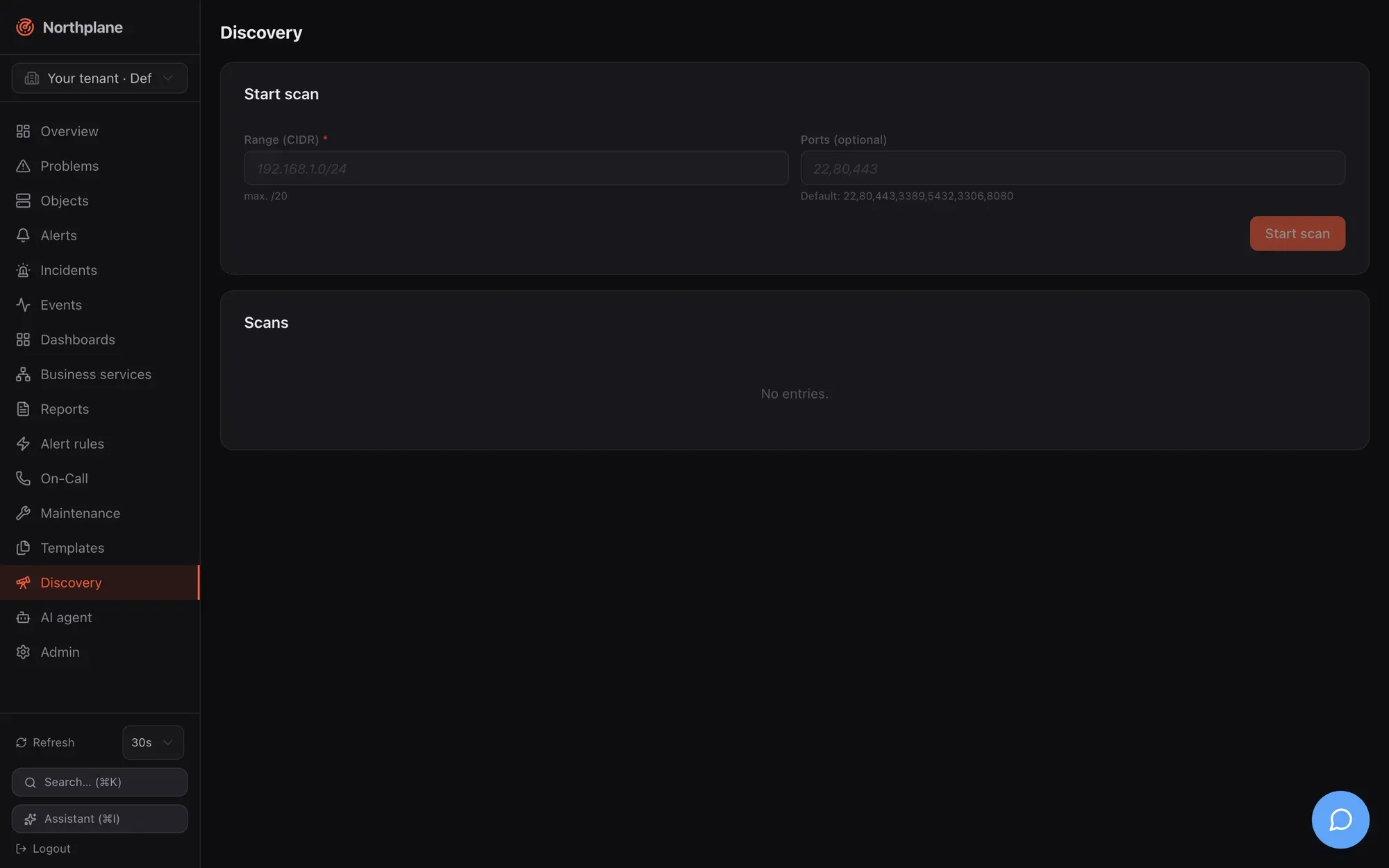
Discovery answers “what is out there” for a subnet you already own: Northplane sweeps a CIDR
with TCP connects, records which ports answered, resolves reverse DNS and proposes builtin checks
per open port. Nothing is created automatically — you review the hits and adopt the ones you want
as hosts. The feature lives on the Discovery page (sidebar entry Discovery) and behind
/api/v1/discovery/scans.
What a scan does
Section titled “What a scan does”| Aspect | Behaviour |
|---|---|
| Probe | plain TCP connect per address and port, 800 ms dial timeout; no ICMP, no SNMP, no banner grabbing |
| Range | any CIDR up to /20 (4096 addresses); larger ranges are rejected with 422 scan limited to /20 or smaller; the network address itself is skipped |
| Refused ranges | loopback, link-local (including 169.254.169.254), multicast and the unspecified address are refused (SSRF guard); RFC 1918 ranges are the normal case and allowed |
| Ports | the request’s ports list, default 22, 80, 443, 3389, 5432, 3306, 8080 |
| Concurrency / limits | 64 addresses in parallel, 10 minutes overall deadline per scan |
| Per hit | address, reverse-DNS name (first PTR), list of open ports, suggested checks |
| Suggestions | 22 → builtin:ssh-banner; 80 → builtin:http -p 80; 443 → builtin:http -S and builtin:tls-cert; 5432 → builtin:tcp -p 5432 (postgres); 3306 → builtin:tcp -p 3306 (mysql); any other port → builtin:tcp -p <port> |
| Lifetime | scans live in memory of the server process, newest first, per tenant — a restart forgets them |
| Safety | a panic inside the scanner marks that scan failed and leaves the server running |
Hosts without a single open port do not appear at all, so a firewalled host that only answers ICMP is invisible to discovery — add it by hand or with Batch add.
Starting a scan
Section titled “Starting a scan”UI: Discovery → Start scan (Scan starten): enter the CIDR (hint “max. /20”) and, optionally, a comma-separated port list; the scan appears in the table below with status running and the page polls every 5 s until it is done or failed. The table shows status, CIDR, when it started, the number of suggestions and a Suggestions (Vorschläge) button.
API (permission config:write, reference):
curl -sS -X POST "$NP_SERVER/api/v1/discovery/scans" \ -H "Authorization: Bearer $NP_TOKEN" -H "Content-Type: application/json" \ -d '{"cidr":"10.10.10.0/24","ports":[22,80,443,161,5693]}'# HTTP 202# {"id":"0199…","tenantId":"…","cidr":"10.10.10.0/24","ports":[22,80,443,161,5693],# "status":"running","startedAt":"2026-08-23T09:12:00Z"}The call returns immediately with 202 Accepted; the sweep runs in the background. Note that a
TCP probe on UDP services (161/snmp above) never succeeds — list TCP ports only. Each start is
audited as discovery.scan.
Reading the results
Section titled “Reading the results”curl -sS "$NP_SERVER/api/v1/discovery/scans" -H "Authorization: Bearer $NP_TOKEN" # list, newest firstcurl -sS "$NP_SERVER/api/v1/discovery/scans/$SCAN_ID" -H "Authorization: Bearer $NP_TOKEN" # one scan(list,
single scan; permission objects:read.)
{ "id": "0199…", "tenantId": "…", "cidr": "10.10.10.0/24", "ports": [22, 80, 443], "status": "done", "startedAt": "2026-08-23T09:12:00Z", "doneAt": "2026-08-23T09:12:41Z", "found": [ {"address": "10.10.10.11", "hostname": "saas1.lab.local.", "openPorts": [22, 443], "suggest": ["builtin:ssh-banner", "builtin:http -S", "builtin:tls-cert"]}, {"address": "10.10.10.20", "hostname": "targets.lab.local.", "openPorts": [22, 80, 443], "suggest": ["builtin:ssh-banner", "builtin:http -p 80", "builtin:http -S", "builtin:tls-cert"]} ]}status is running, done or failed (with error); found is sorted by address once the
scan is done and is absent while nothing has answered yet. Hostnames keep the trailing dot of the
PTR record; the UI strips it when it creates objects.
Turning suggestions into objects
Section titled “Turning suggestions into objects”Click Suggestions on a finished scan. The panel offers:
- Folder (Zielordner), default
/discovered, and optional Templates applied to every new host; - a table with a checkbox per hit (all pre-selected), address, hostname, open ports, suggested checks and, after submitting, a per-row result;
- Accept selected (Ausgewählte übernehmen).
Accepting calls POST /api/v1/objects:batch with mode: partial and one host per selected
row: name = hostname without the trailing dot (or the address), the chosen folder, the label
discovered=true, spec.address, the templates, and checkCommand: builtin:icmp. The result
line shows created/failed counts and the error per row (for example when a host of that name
already exists).
The discovered=true label is handy later: GET /api/v1/hosts?selector=discovered=true lists
everything that came in through discovery, a downtime or silence by that selector covers all of it,
and np apply --prune with a selector cleans up an experiment.
Limits and caveats
Section titled “Limits and caveats”- A scan is not persisted: after a server restart the list is empty. Adopt hits soon after the scan, or export the JSON.
/20is the hard upper bound per scan; split larger networks into several scans.- The scanner sees only TCP listeners on the ports you list. Hosts behind strict firewalls, pure UDP services (SNMP, NTP, DNS) and ICMP-only hosts are not found.
- Reverse DNS uses the server’s resolver; without PTR records the address becomes the host name.
- Starting a scan needs
config:write(it is a configuration action and audited); reading scans needsobjects:read; accepting suggestions needsobjects:write. - Discovery creates hosts in the current tenant (the tenant header rules of the API apply).
- There is no scheduled or recurring discovery — run scans by hand or from a cron job against the API.