
Admin
Admin (Administration) at /admin gathers everything that is not day-to-day monitoring: identity and access, the alarming building blocks (contacts, channels, event sources, heartbeats, webhooks), multi-tenant and federation management, secrets and tokens, integration helpers (MCP, agents), operational queues (dead letters, AI approvals), configuration as code, the audit log, system health and the instance’s appearance. The page shows up to 21 tabs (wrapped into rows, filtered to what your permissions can actually use); the first visible tab is selected by default, and the active tab is mirrored into ?tab= so Admin views deep-link and survive back/forward.
The 21 tabs
Section titled “The 21 tabs”Permissions are what the API requires; “read / write” means list/get vs. create/update/delete. Built-in roles: admin has everything, operator has no admin:* and no config:write, viewer reads only — see Users, roles and permissions.
| # | Tab EN (DE) | What it offers | Main endpoints | Permission |
|---|---|---|---|---|
| 1 | Users (Benutzer) | Local/OIDC/LDAP users, create, edit, set password, disable, delete; LDAP sync card; change own password | /api/v1/users, …/{id}:set-password, /api/v1/users/me:change-password, /api/v1/directory/status, /api/v1/directory:sync |
admin:users (own password: any session user) |
| 2 | Roles (Rollen) | Custom roles with permissions, includes, IdP groups, scope | /api/v1/roles |
admin:read / admin:write |
| 3 | Contacts (Kontakte) | People to notify, with notification preferences | /api/v1/contacts |
oncall:read / oncall:write |
| 4 | Contact groups (Kontaktgruppen) | Named sets of contacts, optional IdP group | /api/v1/contact-groups |
oncall:read / oncall:write |
| 5 | Channels (Kanäle) | Notification channels of 13 types, test send | /api/v1/channels, …/{name}:test-notification |
objects:read / config:write |
| 6 | Event sources (Event-Quellen) | Inbound integrations of 11 types with ingest URLs | /api/v1/event-sources |
objects:read / config:write |
| 7 | Webhooks | Outgoing webhook subscriptions on events | /api/v1/webhooks |
objects:read / config:write |
| 8 | Heartbeats | Dead-man inputs with beat URL | /api/v1/heartbeats, …/{name}/beat |
objects:read / config:write (beat: objects:write) |
| 9 | Tenants (Mandanten) | List and create tenants | /api/v1/tenants |
admin:tenants |
| 10 | Sites (Standorte) | Federation edges: status, bundle editor | /api/v1/sites:overview, /api/v1/sites |
objects:read / config:write |
| 11 | Secrets | Write-only secret store, $SECRET:name$ references |
/api/v1/secrets |
admin:secrets |
| 12 | API tokens (API-Tokens) | Mint, list, revoke tokens | /api/v1/api-tokens |
admin:tokens |
| 13 | MCP | MCP endpoint, scope presets, client snippets | POST /api/v1/api-tokens |
admin:tokens (to mint) |
| 14 | Agents | np-agent install, token, agent.yaml, service units |
POST /api/v1/api-tokens |
admin:tokens (to mint) |
| 15 | Dead letters (Dead-Letters) | Permanently failed deliveries, replay | /api/v1/notifications/dead-letters, …/{id}:replay |
alerts:read / alerts:ack |
| 16 | Config bundles (Config-Bundles) | Export YAML, plan and apply a pasted bundle | /api/v1/config/bundles:export, :plan, :apply |
objects:read (export, plan) / config:write (apply) |
| 17 | Audit log (Audit-Log) | Hash-chained audit trail, verify, NDJSON export | /api/v1/audit, :verify, :export |
admin:audit |
| 18 | AI approvals (AI-Freigaben) | Proposed AI actions, approve/deny | /api/v1/ai/actions, …/{id}:approve, …:deny |
alerts:read / config:write (approve) / alerts:ack (deny) |
| 19 | AI providers (KI-Provider) | Shared LLM connections, agent tool policy | /api/v1/ai/connections, /api/v1/ai/tools, /api/v1/ai/policy |
events:read (+ admin:ai for shared connections and the policy) |
| 20 | System health (System-Health) | system/info and system/health JSON, link to /metrics |
/api/v1/system/info, /api/v1/system/health |
none (anonymous endpoints) |
| 21 | Appearance (Darstellung) | Instance-wide colour theme and light/dark mode | /api/v1/branding, /api/v1/whoami |
read: any user; change: config:write |
Most tabs use the generic resource API pattern: list GET …?limit=500, get with ETag, POST to create, PUT …/{name} with If-Match, DELETE. A 409/412 on save shows “Conflict — please reload.” Deletes are two-click inline confirmations (“Really delete?”).
Users (Benutzer)
Section titled “Users (Benutzer)”Table: Name (with an LDAP or OIDC badge for non-local accounts), E-mail, Roles (Rollen), Status, Last seen (Zuletzt gesehen — stamped on session activity). Per row: Set password (Passwort setzen; local users only), Edit, Delete. The last remaining admin cannot be deleted.
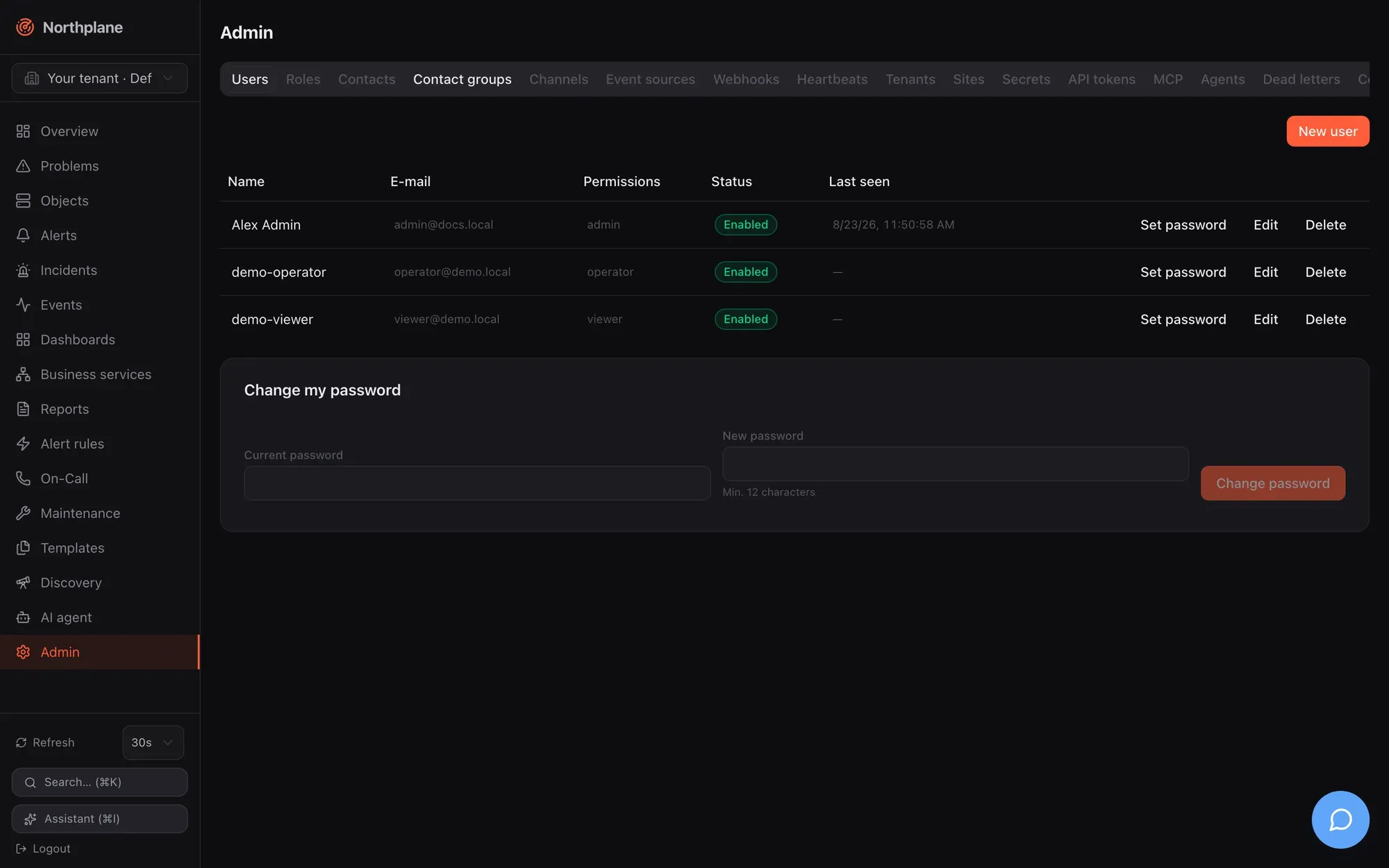
New user (Benutzer anlegen) dialog: Name, E-mail, Password (Passwort; optional for new users, minimum 12 characters; “Empty = OIDC login only”), Roles (list with suggestions from GET /api/v1/roles), switch Disabled (Deaktiviert). Calls: POST /api/v1/users, PUT /api/v1/users/{id}, POST /api/v1/users/{id}:set-password (“Leaving it empty removes the password (OIDC only)”), DELETE /api/v1/users/{id}.
Two footer cards: Directory sync (LDAP) (Verzeichnis-Sync (LDAP)) appears only when LDAP is configured and shows URL, interval, last run, counts (new / updated / deactivated / skipped), warnings and a Sync now (Jetzt synchronisieren) button (POST /api/v1/directory:sync); Change my password (Mein Passwort ändern) takes the current and a new password (≥ 12) and calls POST /api/v1/users/me:change-password. Note that GET /api/v1/users lists users of the whole installation, not only the current tenant. Authentication sources and password policy: Authentication.
Roles (Rollen)
Section titled “Roles (Rollen)”Table: Name (built-in roles carry a System badge and have no edit/delete buttons), Permissions (Berechtigungen), Inherits (Erbt), IdP groups. Dialog: Name, Permissions (list; hint “e.g. objects:read, alerts:ack, "*" for all”), Inherits from roles (includes), IdP groups (auto-assignment) (group names or DNs mapped at OIDC/LDAP login), Scope: tenant / folder / selector. The scope fields are stored but not enforced in this version, and the API does not protect system roles from PUT/DELETE — only the UI hides the buttons (see Known issues). Permission names and semantics: Users, roles and permissions.
Contacts (Kontakte)
Section titled “Contacts (Kontakte)”Table: Name, E-mail, Phone (Telefon), Time zone (Zeitzone), Profiles (Profile). Dialog: Name (locked on edit), E-mail, Phone (E.164, e.g. +491701234567), Time zone (e.g. Europe/Berlin), and the Notification preferences (Benachrichtigungs-Präferenzen) editor — ordered rows of Profile, Time period (Zeitperiode, “(always)” when empty), Min. severity (“(all)” when empty) and Channels (order = priority). How preferences interact with escalation steps (a step that names channels overrides them) is in Contacts and on-call. A GDPR data export per contact exists as GET /api/v1/contacts/{name}:data-export (admin:audit).
Contact groups (Kontaktgruppen)
Section titled “Contact groups (Kontaktgruppen)”Table: Name, Members (Mitglieder), IdP group. Dialog: Name, Members (list with contact-name suggestions), IdP group (optional — mirrors an Entra/Keycloak group).
Channels (Kanäle)
Section titled “Channels (Kanäle)”Table: Type (Typ), Name, Status, Template, per row Send test (Test senden → POST /api/v1/channels/{name}:test-notification, config:write), Edit, Delete. Dialog: Name, Type (email, webhook, slack, teams, ntfy, sms, push, voice, mqtt, servicenow, zendesk, jira, ticket), switch Enabled (Aktiv), a Configuration block with typed fields per type (for email the fields follow the provider smtp / sendmail / resend / ses; secret fields show the hint “Value or $SECRET:name$ reference”), the Delivery / retries group (max delivery attempts, backoff seconds, backoff cap), a More settings key/value editor for any additional config keys, and an optional Template override.
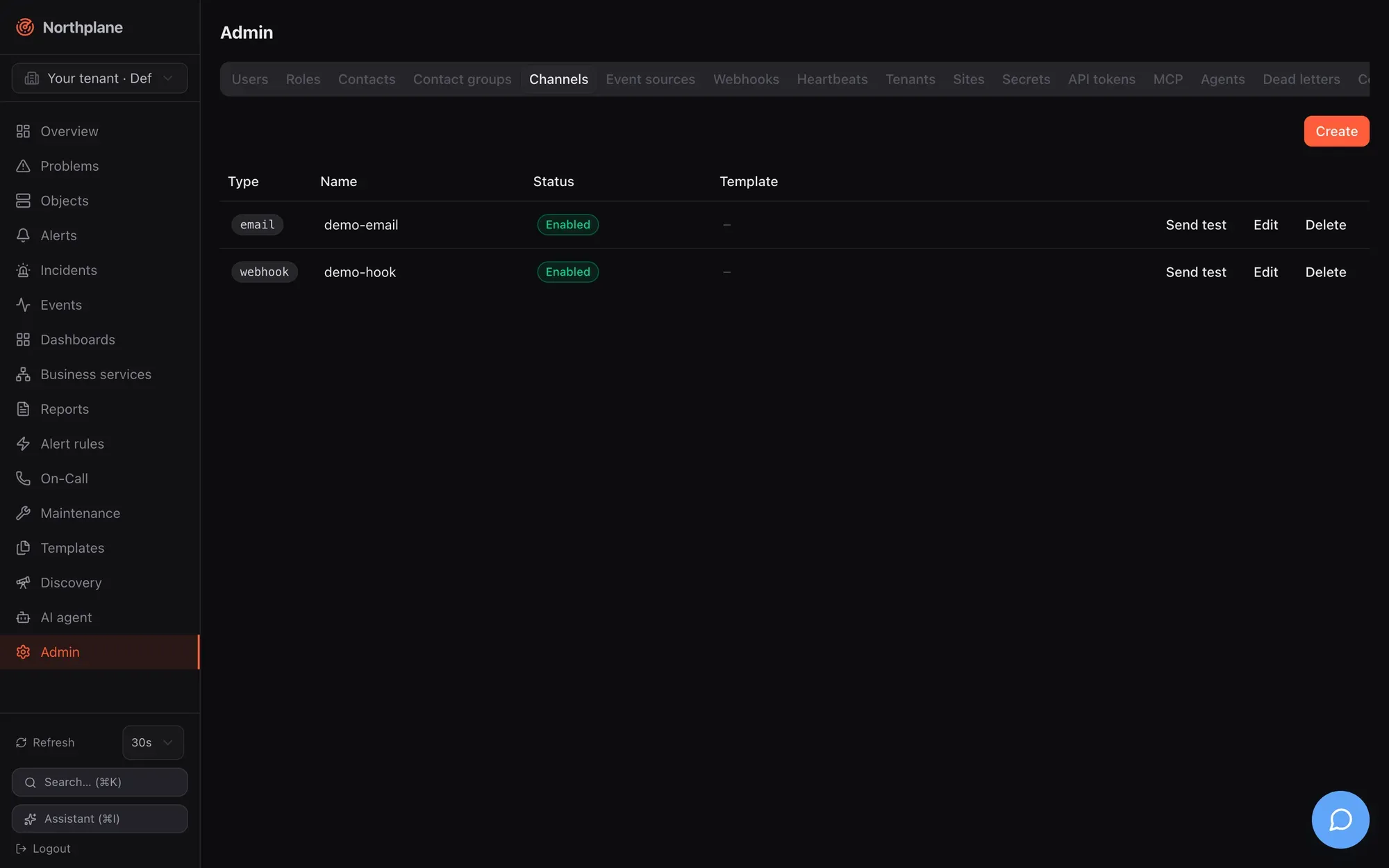
Two hints in the dialog are worth repeating: for push, “Web push: VAPID server-side, no config needed. FCM/APNs only for the mobile app.”; for voice, “During the call: press 4 to acknowledge, 6 to resolve the alarm”. Every type’s config keys, the $SECRET:name$ syntax and the rule that escalation steps use the alphabetically first enabled channel of a type are in Channels. Remember to switch Enabled on — a disabled channel is skipped silently.
Event sources (Event-Quellen)
Section titled “Event sources (Event-Quellen)”Table: Type, Name, Status, and the ingest URL to configure at the sender: /api/v1/ingest/<name> for webhook and alertmanager, /api/v1/voice/inbound/<id> for voice-inbound, /api/v1/sms/inbound/<id> for sms-inbound, agi://<host>:4573/<id> for asterisk-inbound. Dialog: Name, Type (webhook, alertmanager, snmp-trap, imap, email, voice-inbound, sms-inbound, asterisk-inbound, mqtt, espa, espa-x), Enabled, Rate limit (events/s) and burst, Auth mode (none / token / hmac / basic) with a Secret reference, then type-specific blocks (SNMP listener/community/v3 protocols and secret refs; IMAP host/port/TLS/mailbox/folder/poll interval/markSeen; Twilio voice/SMS with IVR menu, language, voice, allowed senders, escalation policy, Twilio auth token; SMS Action event/alert and ACK keyword; MQTT broker/topics/QoS; ESPA listen address; AGI listen address, TTS application, recording directory), Mapping (CEL) for webhooks (“NormEvent fields from the raw payload”), Labels (“merged into every event”) and More settings. Every type with its config table and an example lives in Event sources; the telephony ones additionally in Voice and IVR.
Webhooks
Section titled “Webhooks”Outgoing webhook subscriptions: Name, URL, Event types (Event-Typen; comma-separated, empty = all), Selector (optional, matched against the event’s labels), Status. Dialog adds the HMAC secret (sent as X-Northplane-Signature: sha256=<hex>) and Enabled. Payload, retries and examples: Outgoing webhooks.
Heartbeats
Section titled “Heartbeats”Dead-man inputs for cron jobs and scripts: table Name, Expected every (Erwartet alle), Grace (Karenz), Severity, Last beat (Letzter Beat, “never” until the first), Status (a missing (fehlt) badge when overdue). Dialog: Name (locked on edit, placeholder backup-job), Expected every (required, e.g. 1h), Grace (optional) (e.g. 10m), Severity (the form defaults to critical), Labels, and a copyable beat command:
curl -H "Authorization: Bearer np_…" https://<instance>/api/v1/heartbeats/<name>/beatThe beat needs a token with objects:write; GET and POST both work. A missed beat produces a heartbeat_missed event — an alert still needs a rule (for example event.type == "heartbeat_missed"). Heartbeats vs. the outgoing dead-man URL: Heartbeats.
Tenants (Mandanten)
Section titled “Tenants (Mandanten)”List: Name, Slug, Status, ID; Create with Name and Slug (“URL-friendly short name”) → POST /api/v1/tenants. The tab states it plainly: “Tenants can be created here but not yet renamed or deleted.” — there is no update or delete API. Creating a tenant seeds the built-in roles into it. Switching into a tenant is done with the sidebar tenant switcher; the model is in Tenants and sites.
Sites (Standorte)
Section titled “Sites (Standorte)”The federation fleet view from GET /api/v1/sites:overview: Name, Status (Connected / Disconnected — a heartbeat younger than 5 minutes counts as connected), Last seen, Version, hosts/services, Open alerts, Configuration (Applied or Apply error), Edit, Delete. Dialog: Name, Description, Config bundle (YAML) (“Pulled and applied by the edge instance; validated on save” — invalid YAML is rejected with 422), checkbox Disabled (reject edge access). The hint under the form explains the edge side: create a token with scope sites:connect and put federation: { mode: edge, mainUrl: …, token: np_…, site: <Name> } into the edge’s config.yaml. Full model and the worked VM104 example: Federation and Tenants and sites.
Secrets
Section titled “Secrets”“Values are stored encrypted and never shown again. Reference in channels/sources:” — the table lists Name and the Reference $SECRET:name$; Create takes Name (e.g. smtp-password) and Value (“Never shown again.”) → PUT /api/v1/secrets/{name}; Delete → DELETE /api/v1/secrets/{name}. GET /api/v1/secrets returns names only. Encryption, the secret.key file and where references are accepted: Secrets.
API tokens (API-Tokens)
Section titled “API tokens (API-Tokens)”Create token (Token erstellen): Name and scopes (comma-separated) (default objects:read,alerts:read) → POST /api/v1/api-tokens; the minted np_… token is shown once (“Shown once — save it now:”). Table: Name (a sparkle marks AI-agent tokens), Prefix (np_<prefix>…), Scopes, Last used (Zuletzt), Revoke (Widerrufen → DELETE /api/v1/api-tokens/{id}). Expiry, IP binding, rotation (…:rotate) and the aiAgent flag are API-only in this version — see API tokens.
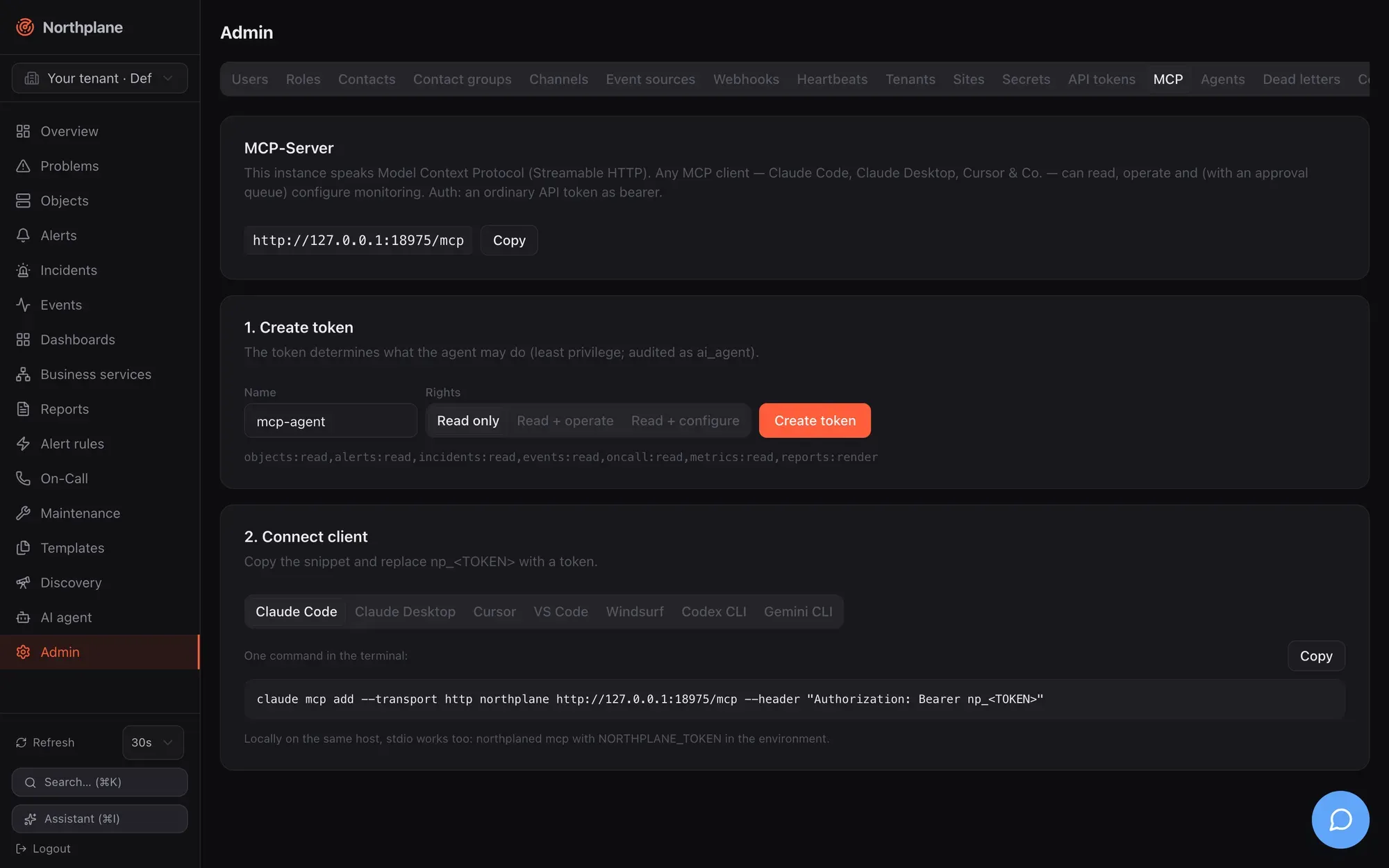
The integration helper for AI clients. It shows the MCP URL https://<instance>/mcp (copy button) and two steps: 1. Create token with a scope preset — Read only (Nur lesen), Read + operate (Lesen + Bedienen), Read + configure (Lesen + Konfigurieren) — minted with aiAgent: true so calls are audited as ai_agent; 2. Connect client with ready-made snippets for Claude Code, Claude Desktop, Cursor, VS Code, Windsurf, Codex CLI and Gemini CLI (the freshly minted token is already inserted). A hint covers the local stdio alternative (northplaned mcp with NORTHPLANE_TOKEN). Tool list, RBAC mapping and the preset-scope caveat: MCP server.
Agents
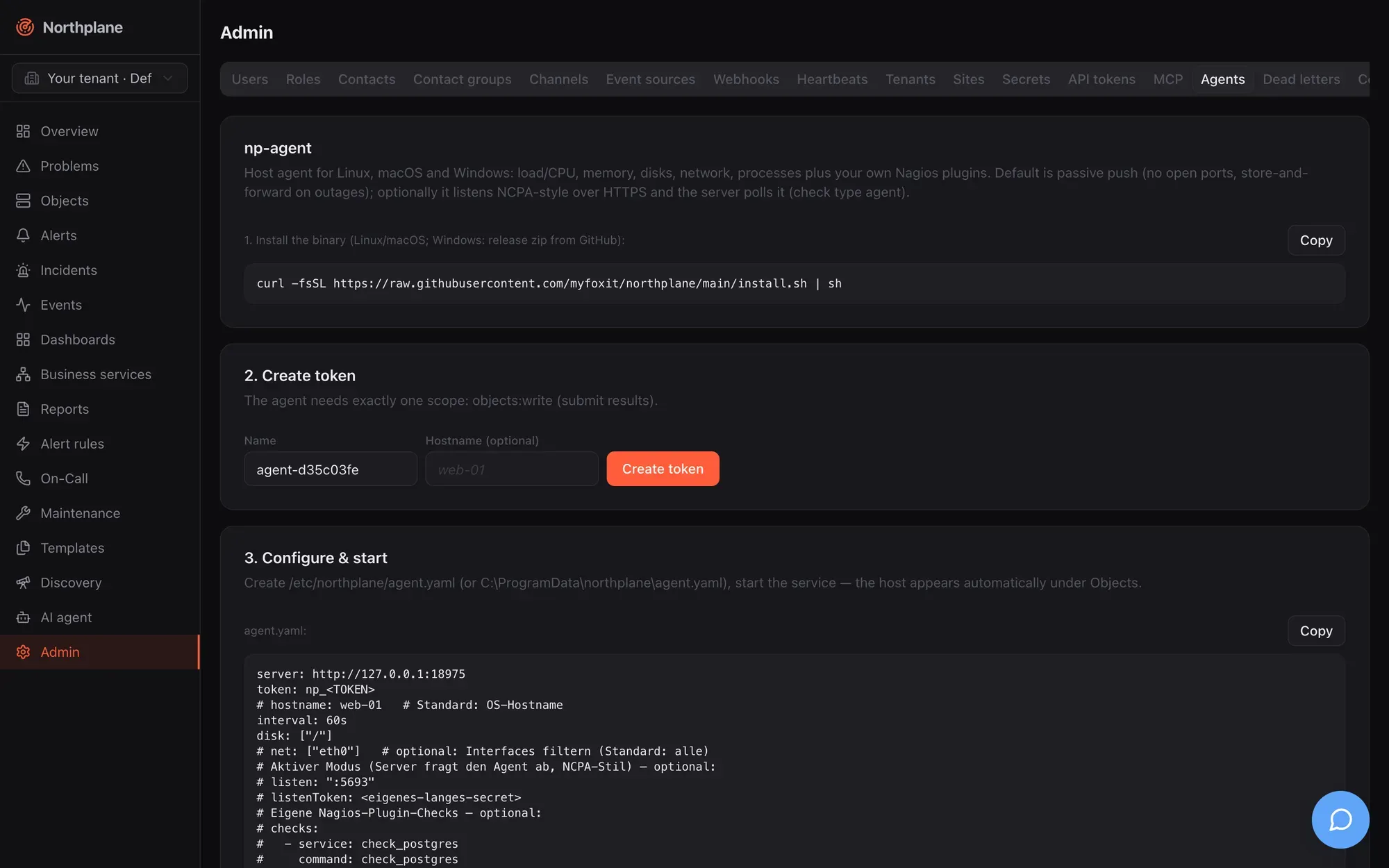
Section titled “Agents”The np-agent enrollment helper: 1. Install the binary one-liner (curl -fsSL https://raw.githubusercontent.com/myfoxit/northplane/main/install.sh | sh), 2. Create token with exactly objects:write and an optional hostname, 3. Configure & start with a prefilled agent.yaml and service-unit tabs for Linux (systemd), macOS (launchd) and Windows (service via PowerShell).
Dead letters (Dead-Letters)
Section titled “Dead letters (Dead-Letters)”“Deliveries that failed permanently (all retries exhausted). Replay requeues them with fresh backoff.” Table: Time, Kind (Art), Attempts (Versuche), Last error, Replay (→ POST /api/v1/notifications/dead-letters/{id}:replay, alerts:ack; the row shows “✓ requeued”). Empty: “No dead letters — all delivered.” The outbox, backoff and the 30-attempt limit: Reliability.
Config bundles (Config-Bundles)
Section titled “Config bundles (Config-Bundles)”Two cards. Export: “The complete configuration as a canonical YAML bundle (backup, GitOps, migration).” — ⇩ Download bundle.yaml fetches GET /api/v1/config/bundles:export as northplane-bundle.yaml. Plan & Apply: paste a bundle → Plan (dry run) (POST /api/v1/config/bundles:plan, Content-Type: application/yaml) → a plan table with create/update/delete badges, kind, name and diff, plus warnings → Apply (POST /api/v1/config/bundles:apply?applyToken=…). The apply token is single-use and valid for 10 minutes, so exactly the reviewed plan is applied; “No changes — configuration is identical.” means the bundle matches. Format, kinds, prune and np apply: Config bundles.
Audit log (Audit-Log)
Section titled “Audit log (Audit-Log)”Filter by action prefix (host., alert., ai. …), Verify chain (Kette prüfen → POST /api/v1/audit:verify, result “Audit chain intact” or “AUDIT CHAIN BROKEN”), ⇩ NDJSON (SIEM) export (GET /api/v1/audit:export). Table: Seq, Time, Actor (Akteur; ai_agent actors are highlighted), Action, Resource. The hash chain, retention (none — no purge) and np audit: Observability.
AI approvals (AI-Freigaben)
Section titled “AI approvals (AI-Freigaben)”Proposed and executed AI tool actions (polled every 15 s): status badge, tool, arguments, actor, time; Approve (Freigeben → …:approve, config:write) and Deny (Ablehnen → …:deny, alerts:ack) for proposed ones. Approving executes the action only when a server-level AI provider is configured (ai.provider); otherwise the action stays approved but unexecuted — see Agent chat.
AI providers (KI-Provider)
Section titled “AI providers (KI-Provider)”Shared connections (for all tenant users): LLM provider connections every user of the tenant can pick in the agent chat — add/edit with the same form as personal connections (Name, Provider, API key stored sealed, Endpoint, Default model, Test), delete with DELETE /api/v1/ai/connections/{id}?shared=true; needs admin:ai. Agent policy (Agent-Richtlinie): “Controls what the agent may do: disabled tools are invisible; auto-approve skips the human approval for a mutating tool.” — a table of all tools (GET /api/v1/ai/tools) with switches Active and Auto-approve (only for mutating tools), Max tool rounds per message (0–24), Save (PUT /api/v1/ai/policy, admin:ai). Providers, tools and the policy model: Agent chat.
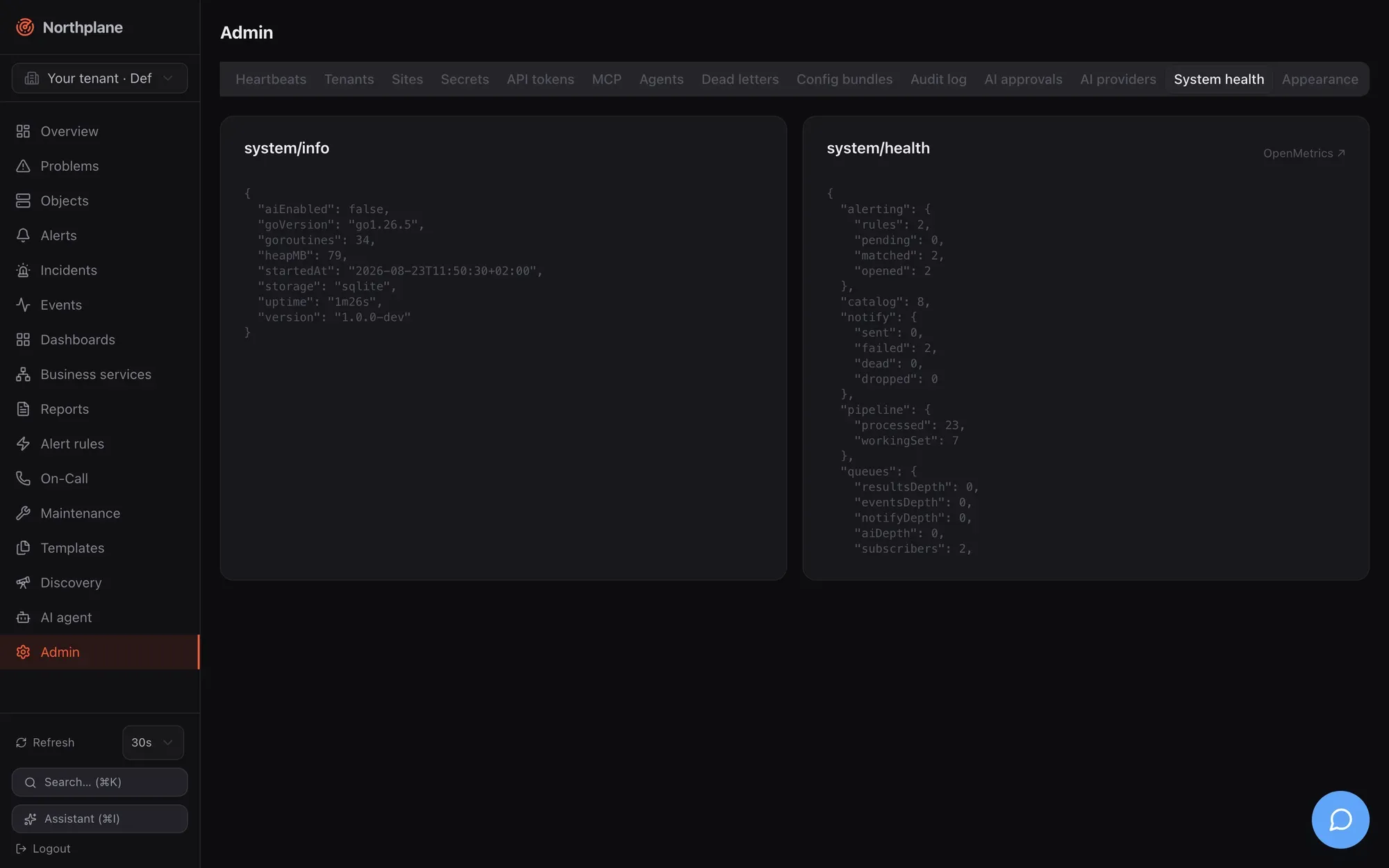
System health (System-Health)
Section titled “System health (System-Health)”Two raw-JSON cards refreshed every 10 s — GET /api/v1/system/info (version, Go version, uptime, storage dialect, goroutines, heap, aiEnabled) and GET /api/v1/system/health (subsystems and queue depths) — and an OpenMetrics ↗ link to /metrics. All three endpoints are reachable without login; restrict them at the proxy if that matters to you. What the fields mean and the Prometheus families: Observability.
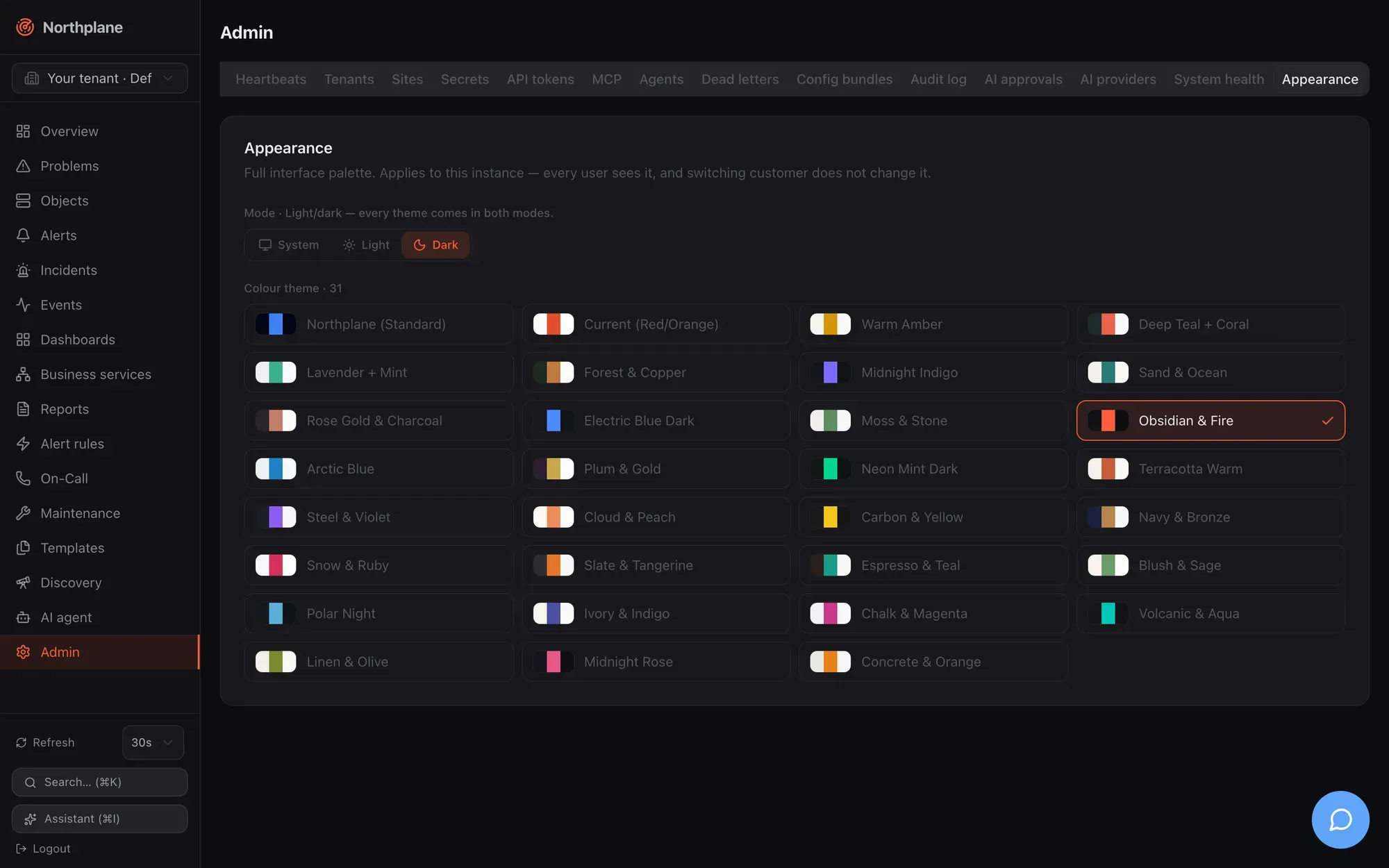
Appearance (Darstellung)
Section titled “Appearance (Darstellung)”Mode (Modus) radio System / Light (Hell) / Dark (Dunkel) — “Light/dark — every theme comes in both modes.” — and the Colour theme (Farbschema) radio grid of 31 themes with swatches. The description says it all: “Full interface palette. Applies to this instance — every user sees it, and switching customer does not change it.” Controls are disabled with the banner “Only administrators with config:write can change this instance’s appearance.” unless you hold config:write; changes are written to PUT /api/v1/branding. Theme list and mechanics: Branding and themes.
The AI agent page (/agent)
Section titled “The AI agent page (/agent)”Not an Admin tab but closely related: AI agent (KI-Agent) is the full chat workspace. Left: New chat (Neuer Chat), the chat list (GET /api/v1/ai/chats, title and age, hover delete) and an AI providers (KI-Provider) button that opens the personal Providers dialog (Name, Provider, API key, Endpoint, Default model, Test; shared connections appear read-only with a Shared badge). Right: the thread. Empty state: “Chat with your infrastructure: the agent operates the Northplane tools under your permissions. Mutating actions require human approval.” with a Connect a provider button when you have no connection yet.
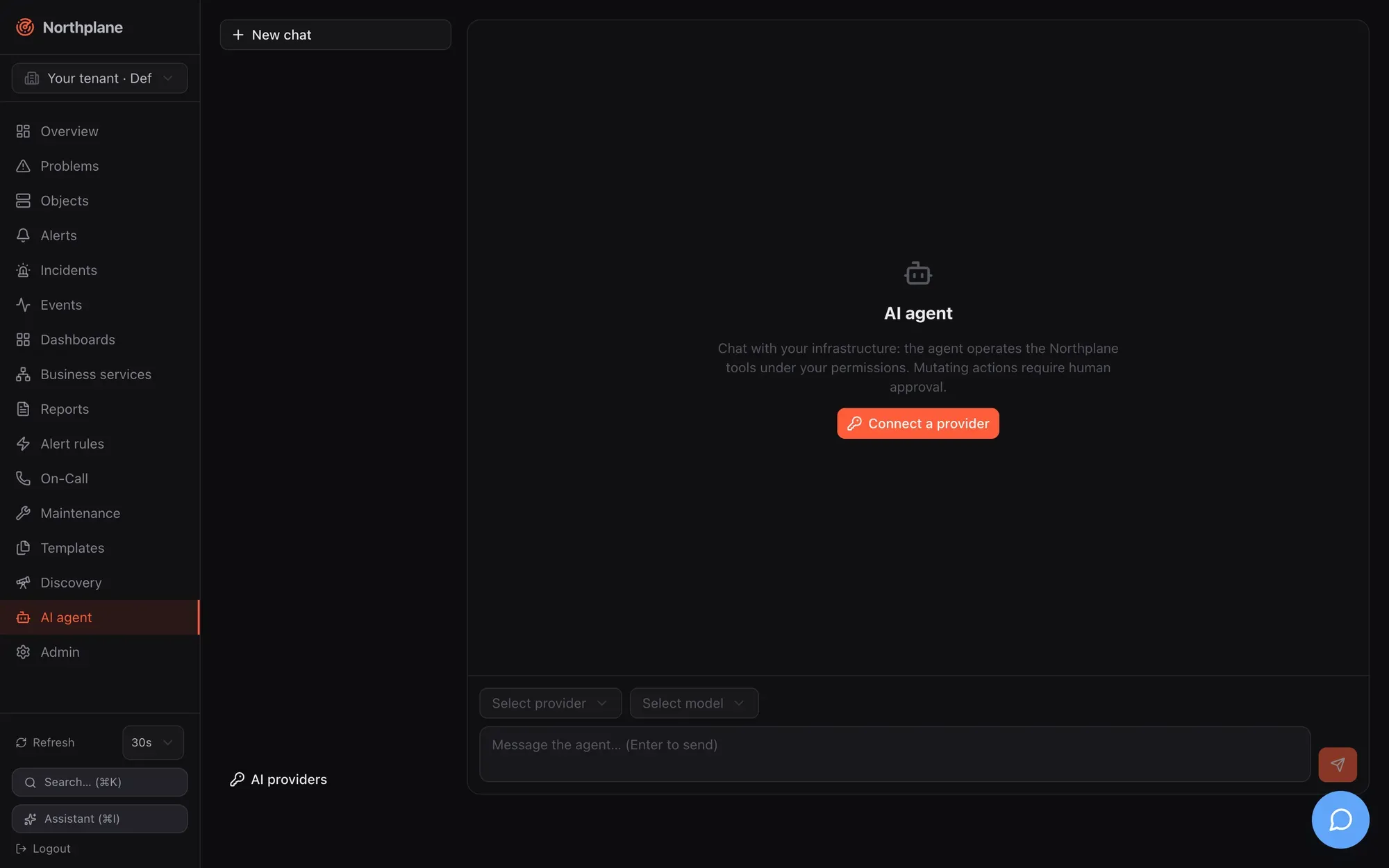
The composer has a connection select, a model select (GET /api/v1/ai/connections/{id}/models), a Tools (Werkzeuge) popover (switch tools on/off, Reasoning effort Standard/low/medium/high), a Stop button while streaming, and the textarea (Enter sends). Sending creates the chat if needed (POST /api/v1/ai/chats) and streams POST /api/v1/ai/chat. Messages render as Markdown (no raw HTML), with collapsible reasoning, tool cards showing input/output, and Approve / Deny buttons on proposed mutating tool calls (“Approval required”); you can regenerate the last answer or delete a message. Everything here requires events:read; tool execution is further limited by your own permissions and the agent policy. Full documentation: Agent chat.