
Escalation policies
An escalation policy is the chain that runs when an alert opens: now page the on-call engineer by push and voice and repeat every five minutes; after 15 minutes, unless acknowledged, call the backup; after 30 minutes notify management and open a ticket. Policies are attached to alert rules (escalationPolicy), to manual alarms, to phone/SMS sources and to IVR options; an acknowledgement ends the chain. Timers are persisted, so a restart loses nothing.
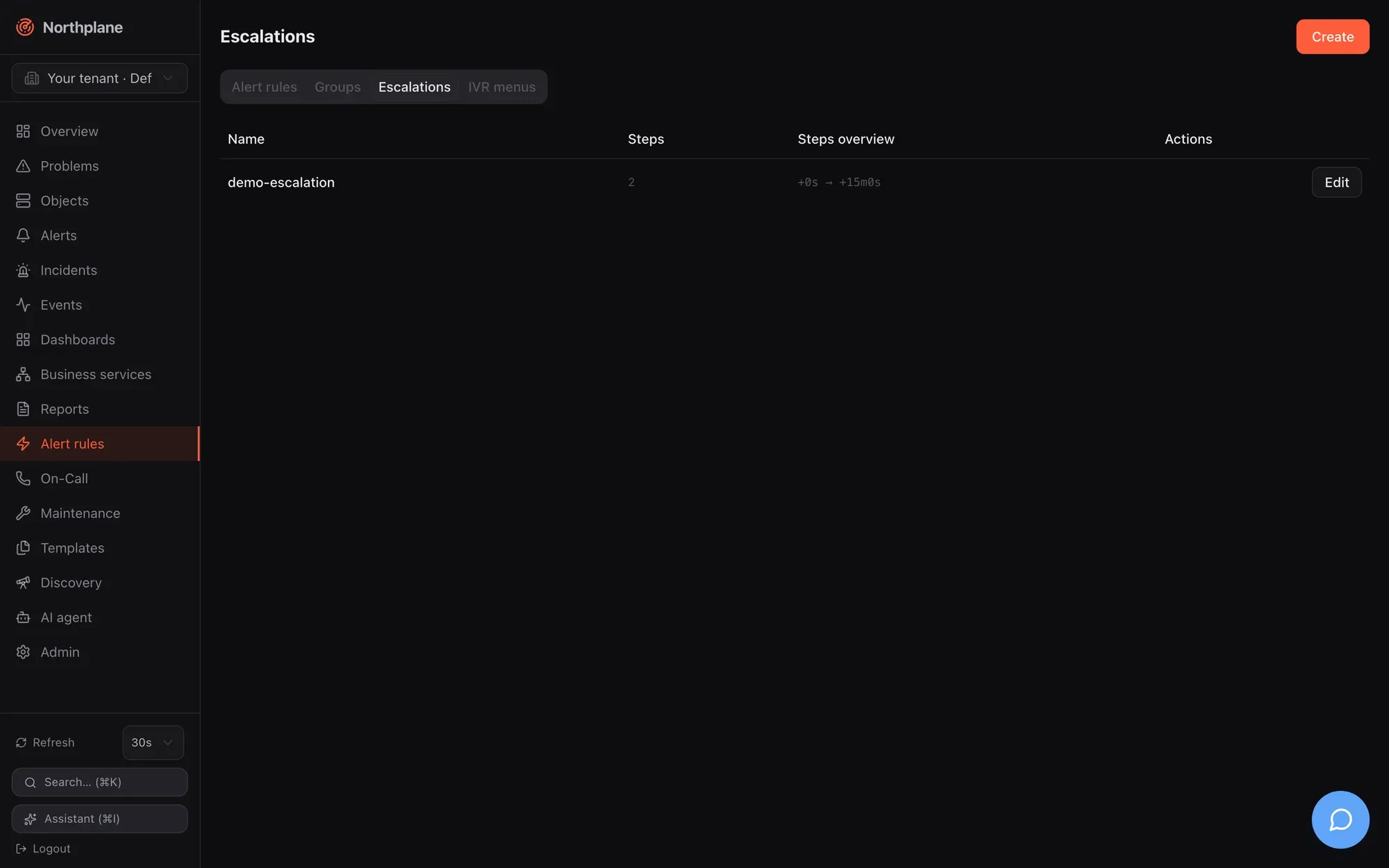
Policies live under Alerting → Escalations (Eskalationen), at /api/v1/escalation-policies (objects:read / config:write; PUT needs If-Match) and in bundles as kind: EscalationPolicy. Generated reference: post_escalation_policies, put_escalation_policies_name, post_escalation_policies_name_simulate.
A policy
Section titled “A policy”kind: EscalationPolicymetadata: { name: nachtdienst }spec: steps: - after: 0s notify: { schedule: bereitschaft } # whoever is on call now channels: [push, voice] # overrides the contacts' preferences repeatEvery: 5m maxRepeats: 3 - after: 15m unlessAcked: true notify: { schedule: bereitschaft, escalateTo: backup } channels: [voice, sms] - after: 30m notify: { contactGroup: leitung } action: { ticket: { channel: snow, autoClose: true, params: { assignment_group: NOC } } }Validation: a policy needs at least one step (422). Step fields:
| Field | Type | Semantics |
|---|---|---|
after |
duration (0s, 15m, 1h; a bare integer is seconds) |
offset from the alert’s openedAt (or from a snooze wake-up) at which the step fires |
unlessAcked |
bool | when the step comes due and the alert is already acked, skip its notifications. The chain ends on ack in every case — see below |
notify |
{schedule, escalateTo, contact, contactGroup} |
who; exactly one target kind is used, precedence schedule > contactGroup > contact; escalateTo: backup only with schedule |
channels |
list of channel types | email, sms, voice, push, ntfy, slack, teams, webhook, mqtt, servicenow, zendesk, jira, ticket — a complete override of every resolved contact’s preferences; empty = use preferences |
repeatEvery / maxRepeats |
duration / int | re-fire this step every repeatEvery, at most maxRepeats more times (needs repeatEvery greater than 0); maxRepeats: 3 means four firings in total |
action |
{ticket: {channel, autoClose, params}} or {webhook: <channel name>} or legacy {servicenow: {assignmentGroup, autoClose}} |
a side effect that rides the outbox, independent of notify |
A step may have only notify, only action, or both. The UI step editor offers the target kinds, the channel picker (email, webhook, slack, teams, ntfy, sms, push, voice, mqtt), repeat settings and the webhook action; ticket actions and ticket channel types are configured through the API or bundles.
Who and how: target and channel resolution
Section titled “Who and how: target and channel resolution”When a step fires, the engine resolves contacts and then channel types per contact:
- Target —
schedule: the person on call now (ResolveOnCallwith the schedule’s overrides);escalateTo: backuptakes the next person in the duty chain; an active override prepends its contact, so the backup during an override is the regular rotation person (the chain is[override, wheel…]).contactGroup: allmembers.contact: that one. Names and ids both resolve. A missing schedule is logged (escalation: schedule missing) and yields nobody; a step without any resolvable contact logsescalation: step has no resolvable contactsand still writes itsescalationevent. How schedules and groups resolve: Contacts and on-call. - Channel types per contact — the step’s
channelsif set; otherwise the contact’s preferences for the alert’s severity at this moment (PreferredChannels, evaluated in the contact’s time zone); if that yields nothing,[email]. - Delivery — every (contact, type) pair becomes one outbox item of kind
notification. The notifier picks the tenant’s first enabled channel of that type in name order and the target from the contact (email,phone,userId) or the channel’surl— the rules on Notification channels.
Actions
Section titled “Actions”An action runs as an outbox item of kind action (payload {action, alert, policy, step}), retried and dead-lettered like notifications but always with the default retry policy.
| Shape | What happens |
|---|---|
ticket: {channel: snow, autoClose: true, params: {…}} |
creates a ticket through the named channel (servicenow, zendesk, jira or generic ticket; must be enabled). params are merged into the provider payload (e.g. assignment_group, urgency, priority, tags); autoClose replaces the channel’s own autoClose setting. The reference is stored on the alert (alert.ticket = {channel, type, ref, url, autoClose}) and mirrored into the incident’s ticketUrl if empty |
servicenow: {assignmentGroup, autoClose} |
legacy shorthand: ticket against the tenant’s first enabled servicenow channel with params.assignmentGroup |
webhook: my-hook |
posts the rendered template of the named webhook channel (must be enabled) |
Actions skip alerts that resolved or expired in the meantime; a repeat (or a later step) does not open a second ticket while alert.ticket.ref is set. Every executed action writes a notification event with status: sent and the provider id. With autoClose, resolving the alert (any path, including auto-close) queues a ticket-close item. Provider details: Ticket channels.
Timers and the firing algorithm
Section titled “Timers and the firing algorithm”Timers are rows in the escalations table (alert_id, policy_name, step_index, repeats_done, next_at, done, keyed by alert + step) — durable across restarts and shared between instances on one database.
- Start (
StartChain): when an alert opens with a policy — rule alerts after the suppression gate, manual alarms immediately — step 0 is scheduled atopenedAt + steps[0].after. A policy without steps is a no-op. - Stop (
StopChain): acknowledge, resolve, snooze and incident resolve mark all of the alert’s timersdone. - Poll: every 2 s, up to 200 due timers per tick.
When a timer is due (fire):
- Alert gone → timer done. Transient database error → left due, retried next tick. Alert
resolvedorexpired→ done. Policy missing or step index out of range → done. acked= the alert’s status isacked;skipped=unlessAcked && acked. If not skipped, the step’s notifications and action are enqueued. If acked, the timer is marked done here — no next step, no repeat.- On the first firing of a step (
repeatsDone == 0) the next step is armed atopenedAt + next.after; if that moment has already passed it is scheduled fornow + 5 s. - If
repeatEveryis set andrepeatsDone < maxRepeats, the same step is rescheduled atnow + repeatEverywithrepeatsDone + 1; otherwise done.
Consequences worth knowing: step N + 1 is armed when step N first fires, regardless of repeats, so repeats of step N and later steps run concurrently; after offsets are absolute from openedAt, not relative to the previous step; a step whose after is smaller than the previous step’s fires about 5 s after it; an alert that is folded into an existing open alert by its dedup key does not start a second chain.
Acknowledge, snooze, resolve
Section titled “Acknowledge, snooze, resolve”- Acknowledge (UI,
POST /api/v1/alerts/{id}:ack, ack link, SMS keyword, IVR, DTMF 4, app) setsackedand stops the chain.unlessAckedonly matters for a step that is already due at that moment: withunlessAcked: false(the default) that step still sends, withtrueit is skipped — either way nothing further is armed. SounlessAcked: trueis the normal choice for every step after the first. - Snooze (
:snooze {"until": …}) acks the alert with a wake-up: if it is still unresolved atuntil, the alert flips back toopen, anescalationeventsnooze expired — alarm re-armedis written, and the chain restarts at step 0 withopenedAtrebased to the wake-up time — allafteroffsets count from then. - Resolve (any path) and auto-close (
expired) end the chain; due timers that fire afterwards are marked done without sending. - Suppression (downtime, silence, flapping, parent down) applies to rule-created alerts only: the alert exists, a
notificationevent withstatus: suppressedis written, and the chain starts only once the suppression lifts while the alert is still open (the re-arm set is in memory and lost on restart). Manual, phone and SMS alarms bypass suppression. Details: Alerts and incidents, Reliability.
All ack paths with their audit records: Acknowledge and snooze.
Simulating a policy
Section titled “Simulating a policy”POST /api/v1/escalation-policies/{name}:simulate (permission alerts:read, no body; the Simulate (Simulieren) button in the policy dialog, saved policies only) answers who would be notified when, resolved for now + after of each step, without touching any alert:
{ "steps": [ { "step": 1, "at": "2026-08-23T10:15:00Z", "after": "0s", "unlessAcked": false, "channels": ["push", "voice"], "schedule": "bereitschaft", "notify": ["Alice"], "repeatEvery": "5m0s", "maxRepeats": 3 }, { "step": 2, "at": "2026-08-23T10:30:00Z", "after": "15m0s", "unlessAcked": true, "channels": ["voice", "sms"], "schedule": "bereitschaft", "notify": ["Bob"] }, { "step": 3, "at": "2026-08-23T10:45:00Z", "after": "30m0s", "unlessAcked": false, "channels": null, "notify": ["Alice", "Carol"], "action": { "ticket": { "channel": "snow", "autoClose": true, "params": { "assignment_group": "NOC" } } } } ]}The simulator honours overrides and the backup offset. One difference to the engine: it lists the names of all target kinds present on a step (schedule and contact and contactGroup), whereas the engine uses only the highest-precedence one — keep one target kind per step to avoid surprises.
Events and audit
Section titled “Events and audit”| Event | When | Payload |
|---|---|---|
escalation |
every step firing, including repeats and steps without contacts | {alertId, step, repeat, contacts: [names], channels} — channels is the step’s override list (empty when preferences were used) |
escalation |
snooze wake-up | {alertId, title, comment: "snooze expired — alarm re-armed", policy} |
notification |
every delivery attempt and every executed action | the NotificationRecord (contact, channel, masked target, status sent/failed, attempt, error, providerId, latencyMs) — one per (contact, channel, attempt) |
notification |
chain blocked by suppression | {alertId, status: "suppressed", error: <reason>} |
Escalation steps do not write audit-log entries; the hash-chained audit log records human actions (alert.ack, alert.resolve, alert.snooze, alert.raise, …). Filter the Events page by escalation and notification to follow a chain; np_notifications_total on /metrics counts outcomes.
Bundle example
Section titled “Bundle example”kind: Contactmetadata: { name: alice } preferences: [{ profile: default, channels: [push, email] }] }---kind: Contactmetadata: { name: bob }---kind: ContactGroupmetadata: { name: leitung }spec: { members: [alice, bob] }---kind: Schedulemetadata: { name: bereitschaft }spec: timeZone: Europe/Vienna layers: - { name: primary, participants: [alice, bob], unit: weekly, anchor: "2026-01-05T08:00:00+01:00" }---kind: EscalationPolicymetadata: { name: nachtdienst }spec: steps: - after: 0s notify: { schedule: bereitschaft } channels: [push, voice] repeatEvery: 5m maxRepeats: 3 - after: 15m unlessAcked: true notify: { schedule: bereitschaft, escalateTo: backup } channels: [voice, sms] - after: 30m unlessAcked: true notify: { contactGroup: leitung } action: { webhook: ops-hook }---kind: AlertRulemetadata: { name: prod-critical }spec: match: 'event.type == "state_change" && event.stateType == "hard" && event.severity == "critical" && event.labels.env == "prod"' severity: critical escalationPolicy: nachtdienstApply order in bundles is Contact, ContactGroup, Channel, Schedule, IVRMenu, EscalationPolicy, EventSource, AlertRule — references are resolved by name at run time, so a policy may reference a schedule that is created in the same bundle. The channels referenced by type (push, voice, sms) and by name (ops-hook) must exist and be enabled: true (Notification channels); apply with np apply -f alarming.yaml (Config bundles).
Patterns
Section titled “Patterns”- Page until someone reacts: one step with
repeatEvery/maxRepeats(5m×3= four attempts over 15 minutes), then escalate tobackup— the ack of the first person ends the repeats. - Let people choose the medium: no
channelson the step; contacts keeppushby day andvoiceby night in their preferences. - Ticket first, people later: step 0 with only
action: {ticket: …}, step 1 after10mwithnotify. - Everyone at once:
notify: {contactGroup: …}withchannels: [sms]— every member gets an SMS in the same step.