
MCP server
Every Northplane instance speaks the Model Context Protocol (MCP), so any MCP client — Claude Code, Claude Desktop, Cursor, VS Code, Windsurf, Codex CLI, Gemini CLI, your own agent — can read, operate and (through the approval queue) configure monitoring with its model. Northplane exposes only tools and prompts; the language model is the client’s. Authentication is an ordinary Northplane API token, so the MCP session is a privilege-less, audited API client with exactly the token’s permissions. The tools are the same 22 tools the AI agent chat uses, and mutating tools go through the same approval queue.
Implementation: the official Go SDK (github.com/modelcontextprotocol/go-sdk), server implementation info name: northplane, title: Northplane Monitoring, version = the northplaned version. One server instance is built per principal/session; tools disabled by the tenant tool policy are not advertised. Resources are not offered (tools and prompts only).
Transports
Section titled “Transports”Streamable HTTP at /mcp
Section titled “Streamable HTTP at /mcp”The running server mounts /mcp (and /mcp/*) next to the API — always in northplaned serve, same origin, same TLS, no extra port.
| Item | Detail |
|---|---|
| URL | https://<instance>/mcp |
| Authentication | per request through the normal authenticator: Authorization: Bearer np_… (an np_session cookie also works technically, but clients use tokens). Missing or invalid credential → 401 with WWW-Authenticate: Bearer resource_metadata="/api/v1/whoami" and the text body MCP requires a Northplane API token. Token expiry and IP binding (ipBind, compared with the TCP peer address) are enforced like everywhere else. |
| Sessions | stateful SDK sessions via the Mcp-Session-Id header (managed by the client library after initialize). The server binds each session id to the authenticating actor: another token reusing the id gets 403 session belongs to another token; a DELETE drops the binding. |
| Timeouts | /mcp and /mcp/* are exempt from the 30 s per-request deadline; the HTTP server has ReadHeaderTimeout 10 s, ReadTimeout 60 s, IdleTimeout 120 s and no WriteTimeout |
| Tenant | the token’s own tenant; X-Northplane-Tenant is not honoured on /mcp |
| Behind a proxy | plain HTTPS, no WebSockets; a reverse proxy that forwards the whole site (such as the bundled Caddy’s reverse_proxy northplane:8443) forwards /mcp too (TLS and reverse proxy) |
Quick check without a client:
curl -si https://np.example.com/mcp # → 401, WWW-Authenticate: Bearer resource_metadata="/api/v1/whoami"curl -s https://np.example.com/api/v1/whoami -H "Authorization: Bearer np_…" # shows the token's permissions = what the MCP session may dostdio: northplaned mcp
Section titled “stdio: northplaned mcp”For a client on the same host as the server, northplaned mcp serves MCP on stdin/stdout:
export NORTHPLANE_TOKEN=np_…northplaned mcp -config /etc/northplane/config.yaml| Item | Detail |
|---|---|
| Authentication | NORTHPLANE_TOKEN must be a valid API token; missing → northplaned: set NORTHPLANE_TOKEN to a Northplane API token (np_…); invalid → northplaned: token: …. The session inherits exactly the token’s scopes. |
| What it opens | the store (SQLite data dir or PostgreSQL DSN from the config), the NP-TSDB and the object catalog directly — it does not talk to a running server, so it needs the same config file and access to the same data |
| Logging | forces logFormat: text on stderr (stdout belongs to the transport); logs mcp: serving on stdio with the actor name |
| Lifetime | runs until the client closes stdin or SIGINT/SIGTERM |
Tokens and RBAC
Section titled “Tokens and RBAC”The MCP session is the token. Each tool call is checked against the token’s permissions with the same permission the equivalent REST route uses; a denial comes back as an MCP tool error error: permission denied: <perm> required and is audited as ai.denied.<tool>. Tool execution then follows the shared gate: tenant policy → RBAC → proposal for mutating tools (unless the policy auto-approves them) → execute → audit (ai.read.<tool>, ai.execute.<tool>, ai.propose.<tool>). Proposals land in Admin → AI approvals, where a human with config:write approves or denies them — see Approvals; approval executes the tool directly (no server-level ai.provider needed).
Recommended token shape: minted with aiAgent: true (audits as actor type ai_agent), scoped to exactly what the agent should do, with an expiry — see API tokens. The built-in role ai-agent is a reasonable starting point (objects:read, alerts:read, alerts:ack, incidents:read, incidents:write, events:read, metrics:read, oncall:read, checks:run, downtimes:write, silences:write, config:propose, reports:render); note that its config:propose is consumed by no tool — the config tools need config:write.
Tool descriptions get a suffix on MCP: mutating tools without auto-execution (mutating: returns a proposal that requires human approval), auto-executing ones (mutating: executes immediately, audited). Annotations are MCP 2025-06-18 hints derived from the registry so they cannot drift: readOnlyHint = not mutating; for mutating tools destructiveHint is true for apply_config_change, create_downtime and create_silence and false otherwise; idempotentHint is true for the two auto-executing tools. Results are TextContent with pretty-printed JSON; errors are returned with isError: true and the text error: …; proposals come back as {"status":"proposed","actionId":"…","note":"queued for human approval (POST /api/v1/ai/actions/<id>:approve)"}.
| Tool | Permission | Kind | Annotations |
|---|---|---|---|
get_overview |
events:read |
read | readOnly |
search_objects |
objects:read |
read | readOnly |
get_object |
objects:read |
read | readOnly |
query_metrics |
metrics:read |
read | readOnly |
get_alerts |
alerts:read |
read | readOnly |
analyze_metric |
metrics:read |
read (deterministic statistics) | readOnly |
forecast_capacity |
metrics:read |
read (deterministic statistics) | readOnly |
suggest_thresholds |
metrics:read |
read (deterministic statistics) | readOnly |
get_incidents |
incidents:read |
read | readOnly |
who_is_oncall |
oncall:read |
read | readOnly |
explain_alert |
alerts:read |
read | readOnly |
render_report |
reports:render |
read | readOnly |
list_config_resources |
per-kind read permission | read | readOnly |
get_config_resource |
per-kind read permission | read | readOnly |
run_check_now |
checks:run |
mutating, executes immediately | destructive false, idempotent |
acknowledge_alert |
alerts:ack |
mutating, executes immediately | destructive false, idempotent |
create_downtime |
downtimes:write |
mutating, proposal (max 4 h) | destructive |
create_silence |
silences:write |
mutating, proposal | destructive |
propose_config_change |
config:write |
mutating, proposal (dry-run plan after approval) | destructive false |
apply_config_change |
config:write |
mutating, proposal | destructive |
upsert_config_resource |
per-kind write permission | mutating, proposal | destructive false |
delete_config_resource |
per-kind write permission | mutating, proposal | destructive false |
Inputs, outputs and the per-kind permission table are documented once, on AI agent chat → Tools. Tools listed in the tenant policy’s disabled[] are not advertised (and are refused on execution as defence in depth); tools in autoApprove[] execute without a proposal.
Prompts
Section titled “Prompts”| Prompt | Description | Returned user message |
|---|---|---|
morning-briefing |
Summarise the overnight state: new problems, incidents, SLA risks. | “Use get_overview, get_alerts and get_incidents to compile a concise morning briefing: what broke since yesterday evening, what is still open, who is on call today (who_is_oncall). End with the top 3 action items.” |
incident-triage |
Triage the currently open incidents: cluster, name, rank by impact. | “List open incidents (get_incidents) and their alerts. For each: name the likely common cause (use explain_alert on a representative alert), the blast radius, and whether it can be acknowledged or needs escalation.” |
config-review |
Review monitoring coverage: untemplated objects, missing checks, noisy rules. | “Search objects (search_objects) and review the monitoring configuration: objects without templates, hosts without services, rules that opened the most alerts (get_alerts). Propose concrete improvements as bundle fragments via propose_config_change.” |
Each prompt returns one user message with the fixed text; no arguments.
Minting a token: Admin → MCP
Section titled “Minting a token: Admin → MCP”Admin → MCP shows the instance’s MCP URL (<origin>/mcp), mints a token with POST /api/v1/api-tokens {name, scopes, aiAgent: true} (needs admin:tokens; the secret is shown once) and renders the per-client snippets below with the token filled in. Scope presets:
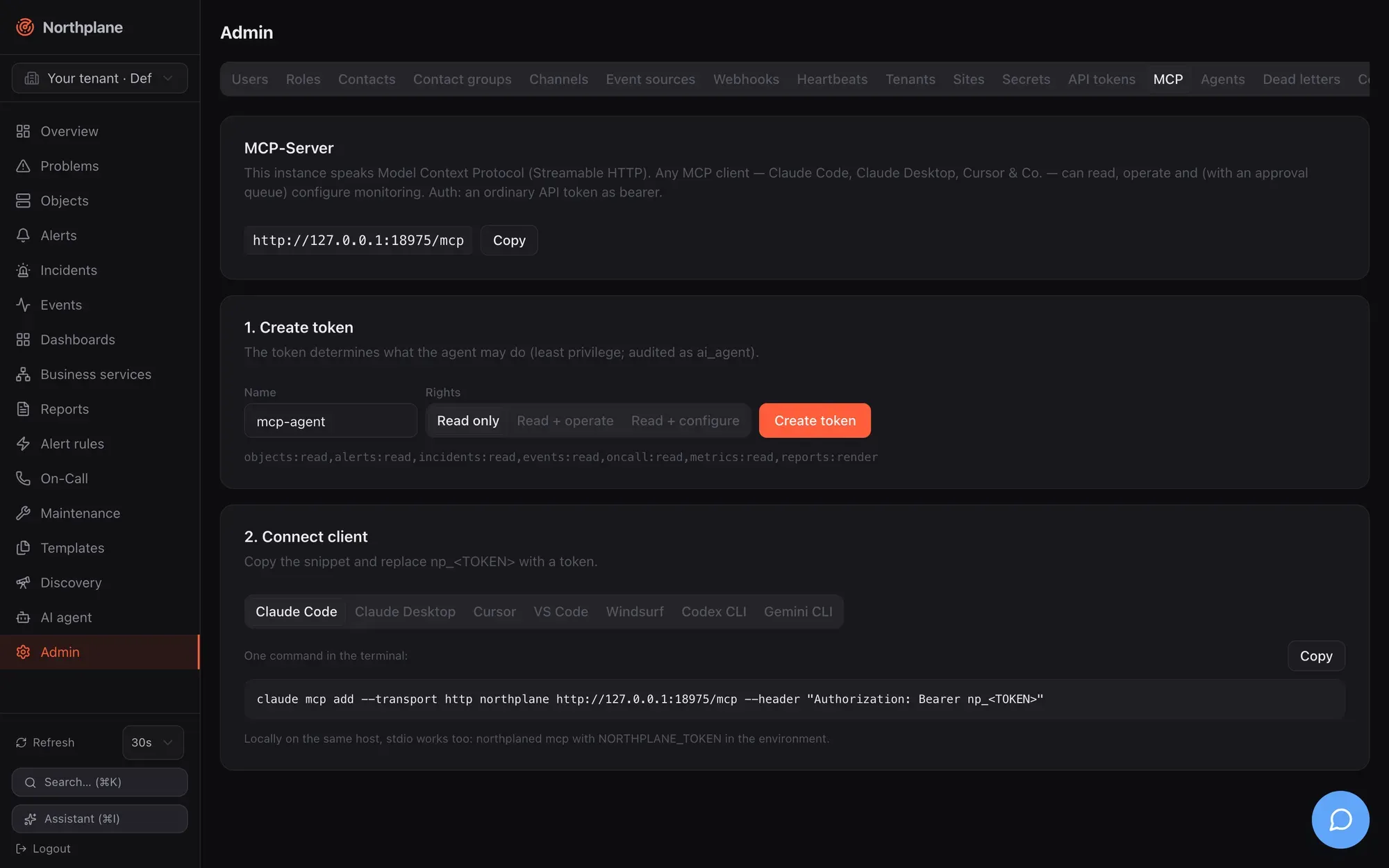
| Preset | Label (EN / DE) | Scopes |
|---|---|---|
read |
Read only / Nur lesen | objects:read,alerts:read,incidents:read,events:read,oncall:read,metrics:read,reports:render |
operate |
Read + operate / Lesen + Bedienen | read set + alerts:ack,checks:run,downtimes:write,silences:write |
configure |
Read + configure / Lesen + Konfigurieren | read set + config:write,oncall:write |
The operate scopes match what the operate tools actually check: acknowledge_alert (alerts:ack), run_check_now (checks:run), create_downtime (downtimes:write) and create_silence (silences:write).
The tab’s footnote reminds you of the local alternative: “Locally on the same host, stdio works too: northplaned mcp with NORTHPLANE_TOKEN in the environment.”
Client configuration
Section titled “Client configuration”Replace https://np.example.com/mcp with your instance URL and np_<TOKEN> with the minted token. The Streamable HTTP snippets are exactly what Admin → MCP generates; the stdio variants are for a client running on the server host (binary path and config path as installed by northplaned init). The flag and key syntax of the stdio forms is each client’s own — check the client’s documentation if it has moved.
Streamable HTTP — one command in the terminal:
claude mcp add --transport http northplane https://np.example.com/mcp --header "Authorization: Bearer np_<TOKEN>"stdio — on the server host:
claude mcp add northplane --env NORTHPLANE_TOKEN=np_<TOKEN> -- /usr/local/bin/northplaned mcp -config /etc/northplane/config.yamlStreamable HTTP — claude_desktop_config.json → "mcpServers" (Settings → Developer → Edit Config); Claude Desktop bridges HTTP through mcp-remote:
{ "mcpServers": { "northplane": { "command": "npx", "args": ["-y", "mcp-remote", "https://np.example.com/mcp", "--header", "Authorization: Bearer np_<TOKEN>"] } }}stdio — same file, on the server host:
{ "mcpServers": { "northplane": { "command": "/usr/local/bin/northplaned", "args": ["mcp", "-config", "/etc/northplane/config.yaml"], "env": { "NORTHPLANE_TOKEN": "np_<TOKEN>" } } }}Streamable HTTP — ~/.cursor/mcp.json (global) or .cursor/mcp.json (project):
{ "mcpServers": { "northplane": { "url": "https://np.example.com/mcp", "headers": { "Authorization": "Bearer np_<TOKEN>" } } }}stdio — same file, on the server host:
{ "mcpServers": { "northplane": { "command": "/usr/local/bin/northplaned", "args": ["mcp", "-config", "/etc/northplane/config.yaml"], "env": { "NORTHPLANE_TOKEN": "np_<TOKEN>" } } }}Streamable HTTP — one command in the terminal (or the equivalent entry in .vscode/mcp.json):
code --add-mcp '{"name":"northplane","type":"http","url":"https://np.example.com/mcp","headers":{"Authorization":"Bearer np_<TOKEN>"}}'stdio — on the server host:
code --add-mcp '{"name":"northplane","type":"stdio","command":"/usr/local/bin/northplaned","args":["mcp","-config","/etc/northplane/config.yaml"],"env":{"NORTHPLANE_TOKEN":"np_<TOKEN>"}}'Streamable HTTP — ~/.codeium/windsurf/mcp_config.json → "mcpServers":
{ "mcpServers": { "northplane": { "serverUrl": "https://np.example.com/mcp", "headers": { "Authorization": "Bearer np_<TOKEN>" } } } }stdio — same file, on the server host:
{ "mcpServers": { "northplane": { "command": "/usr/local/bin/northplaned", "args": ["mcp", "-config", "/etc/northplane/config.yaml"], "env": { "NORTHPLANE_TOKEN": "np_<TOKEN>" } } }}Streamable HTTP — ~/.codex/config.toml (bridged through mcp-remote):
[mcp_servers.northplane]command = "npx"args = ["-y", "mcp-remote", "https://np.example.com/mcp", "--header", "Authorization: Bearer np_<TOKEN>"]stdio — same file, on the server host:
[mcp_servers.northplane]command = "/usr/local/bin/northplaned"args = ["mcp", "-config", "/etc/northplane/config.yaml"]env = { NORTHPLANE_TOKEN = "np_<TOKEN>" }Streamable HTTP — ~/.gemini/settings.json → "mcpServers":
{ "mcpServers": { "northplane": { "httpUrl": "https://np.example.com/mcp", "headers": { "Authorization": "Bearer np_<TOKEN>" } } } }stdio — same file, on the server host:
{ "mcpServers": { "northplane": { "command": "/usr/local/bin/northplaned", "args": ["mcp", "-config", "/etc/northplane/config.yaml"], "env": { "NORTHPLANE_TOKEN": "np_<TOKEN>" } } }}After connecting, ask the client to list tools: you should see the tools above (minus policy-disabled ones) and the three prompts. A good first prompt is morning-briefing.
Security notes
Section titled “Security notes”- The token is the blast radius. Mint a dedicated token per client with the least scopes, an expiry and — where the client has a fixed egress address —
ipBind. Rotate it withPOST /api-tokens/{id}:rotate; revoke withDELETE. Tokens are shown once and stored hashed. - Mutations are gated twice: RBAC on the token, then the approval queue for every mutating tool except
run_check_nowandacknowledge_alert(unless the tenant policy auto-approves more). Disable tools you never want an agent to touch in Admin → AI providers → Agent policy (disabled[]); disabled tools are neither advertised nor executable. - Tool results are untrusted data for the model — event texts, outputs and labels can contain anything an attacker could feed into your monitoring. That is the reason the approval queue exists; keep it on for configuration changes.
- Audit: every tool call (reads included) is recorded as actor type
ai_agentwith the token name; review under Admin → Audit log ornp audit tail. - Network:
/mcpis served by the same listener as the UI/API. Exposing it on the internet is the same decision as exposing the API;/mcpsits outside the API’s CSRF wrapper and has no rate limiting. Keep TLS on (TLS and reverse proxy). - stdio means local data access:
northplaned mcpopens the database and TSDB directly, so whoever can run it with a readable config can read the data directory anyway — the token still decides what the MCP session returns, but protect config and data-dir permissions accordingly. - No tenant switching over MCP: a token acts in its own tenant only.
- General hardening guidance: Security.