
Objects
Objects (Objekte) is where hosts and services live in the UI: a filterable list at /objects, a four-tab create/edit dialog, a batch importer and the object detail page at /objects/<id>. The underlying model — folders, labels, selectors, templates, the check-command grammar, the spec fields and their defaults — is explained in Object model; the task-oriented guide (API and bundle equivalents of everything below) is Hosts and services.
Objects list
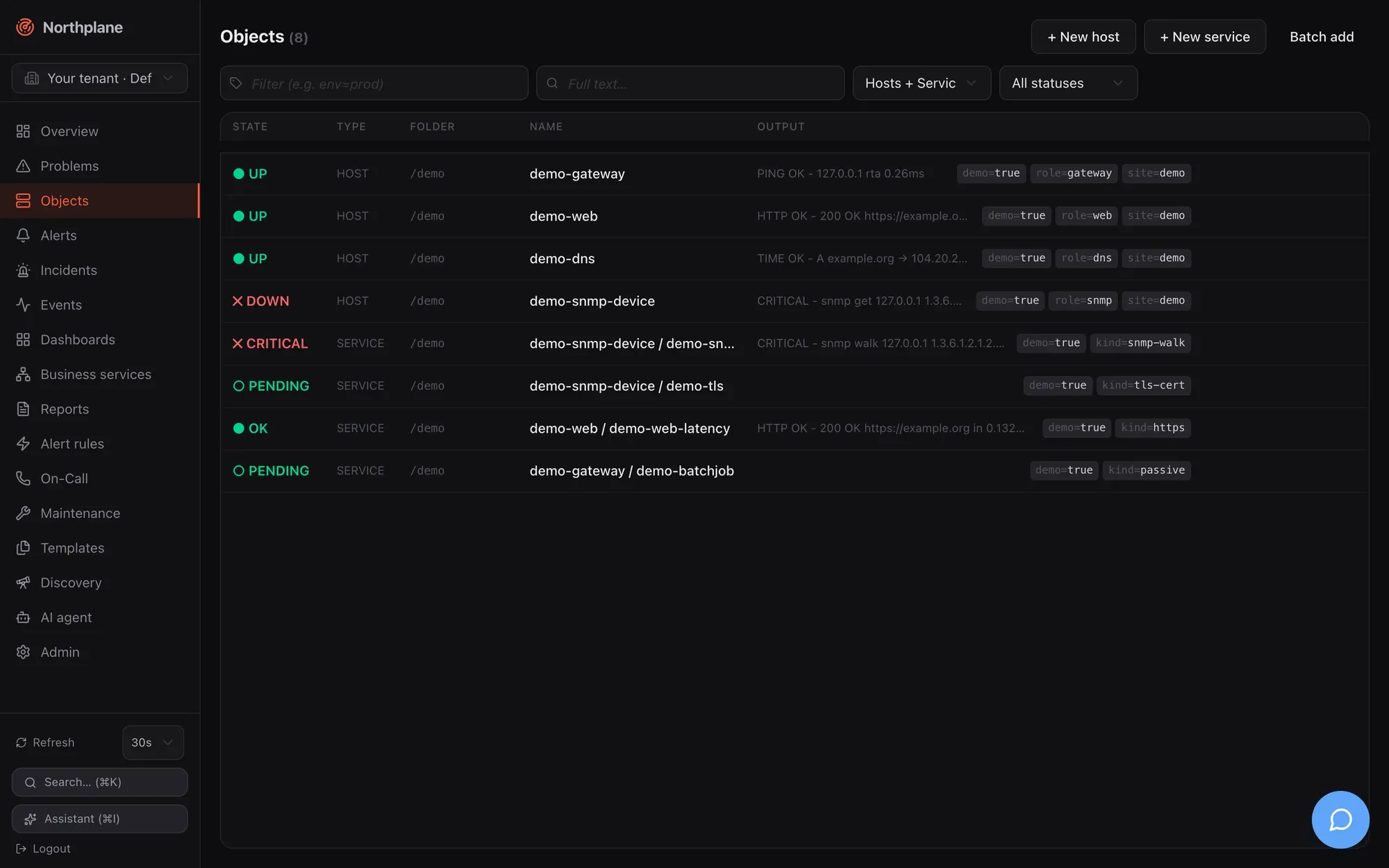
Section titled “Objects list”Route /objects. Data: GET /api/v1/objects?selector=…&q=…&limit=2000 (objects:read), with the kind and state filters applied client-side. The list reloads on your refresh interval.
Filters
Section titled “Filters”All four filters live in the URL (?selector=…&q=…&kind=…&state=…), so a filtered view can be bookmarked or pasted into a chat, and the browser back button restores the previous filter. The two text inputs are written to the URL after a 250 ms pause in typing.
| Control | Placeholder / options | What it does |
|---|---|---|
| Label selector input (tag icon, labelled) | “Filter (e.g. env=prod)” (Filter (z.B. env=prod)) | A label selector — the same grammar as in bundles, silences and dashboards (env=prod, env!=dev, team in (a,b) … see Object model). Sent as selector= to the API. |
| Full text input (search icon, labelled) | “Full text…” (Volltext…) | Free text matched against object name and check output. Sent as q=. |
| Kind select | Hosts + Services / Hosts / Services | Client-side filter on the kind. |
| State select | All statuses (Alle Status), Problems (Probleme), OK, Up, Warning, Critical, Unknown, Down, Unreachable, Pending | Client-side filter on the current hard state. Problems is everything that is not OK/Up/Pending. |
| Reset filter (Filter zurücksetzen) | shown when kind or state is set | Clears kind and state (not the text inputs). |
Column headers State (Zustand), Type (Typ), Folder (Ordner), Name, Output (Ausgabe). Rows are virtualised (only the visible rows plus a small overscan are rendered), so a list of several thousand objects scrolls smoothly. Each row is a link to the object detail and shows: the state badge (or ○ PENDING / AUSSTEHEND for objects that have never been checked), the kind, the folder in monospace, host / name for services, the humanised output and the label chips.
Hovering a row reveals four actions: Check now (Jetzt prüfen, icon; POST /api/v1/objects/{id}/check-now, checks:run), Edit (Bearbeiten; opens the dialog below in edit mode), Duplicate (Duplizieren; opens the create dialog pre-filled from the row — see Duplicating entities) and Delete (Löschen; DELETE /api/v1/objects/{id}, objects:write). Delete is a two-click inline confirmation — the button turns into “Really delete?” (Wirklich löschen?) — and for hosts adds the warning “Also deletes all services on this host?” (Löscht auch alle Services des Hosts?): deleting a host cascades to its services.
The header buttons are + New host (Host anlegen), + New service (Service anlegen) and Batch add (Massenanlage).
Create and edit dialog
Section titled “Create and edit dialog”The same dialog creates and edits hosts and services (title New host / New service or Edit: <name>). It is a four-tab form with a pinned header and footer; only the tab body scrolls. The footer has Cancel (Abbrechen) and Create (Anlegen) or Save (Speichern); the primary button stays disabled until a name (and, for services, a host) is set. Most fields are optional and inherit from templates and defaults, so creating a host is usually a name-plus-address job on the first tab.
Basics (Basis)
Section titled “Basics (Basis)”| Field (EN / DE) | Input | Notes |
|---|---|---|
| Name (required) | text, placeholder web01 / http |
Locked when editing — names are identifiers. |
| Folder (Ordner) | text, placeholder /, hint “e.g. /prod/web” |
The folder path; / is the root. |
| Host (services only, required) | select of all hosts (GET /api/v1/hosts?limit=2000&withState=false) |
Locked when editing (“Host cannot be changed”). |
| Address (Adresse) | text, placeholder 10.0.0.1 / host.example.com |
Used by the $HOSTADDRESS$ macro and builtin checks. |
| Labels | key/value editor (env = prod) |
Free-form labels for selectors, rules and dashboards. |
Check (Prüfung)
Section titled “Check (Prüfung)”| Field (EN / DE) | Input | Notes |
|---|---|---|
| Check command (Check-Kommando) | kind select builtin / Command (defined) (Kommando (definiert)) / exec / agent:exec / passive plus a text field for the remainder | The two parts are joined into the checkCommand reference: builtin:<name> (suggestions from GET /api/v1/check-commands:builtins), a bare <name> of a check command defined under Templates (suggestions from GET /api/v1/check-commands), exec:<plugin>, agent:exec:<plugin> or passive. For passive the text field disappears and the hint reads “Passive: results are fed in externally (agent / API) — no active check.” |
| Arguments (Argumente) | list editor, placeholder --port=5432, hint “One argument per entry ($ARG1$, $ARG2$ …)” |
Passed to the command; positional $ARG1$… macros refer to them. |
| Templates | chips + typeahead over GET /api/v1/templates; hint “Inheritance in declared order (later wins)” |
Order matters — see Templates. |
| Interval & Scheduling box: Interval (Intervall) | duration, placeholder 60s, hint “e.g. 60s, 5m” |
Go duration syntax, validated while typing. |
| Retry interval (Retry-Intervall) | duration, placeholder 15s |
Interval while in a soft state. |
| Max attempts (Max. Versuche) | number ≥ 1 | Soft→hard threshold. |
| Timeout | duration, placeholder 30s |
Per-check timeout. |
| Check period (Prüfzeitraum) | text with suggestions from GET /api/v1/time-periods, placeholder 24x7 |
Stored and resolved into the effective config; the scheduler does not currently consume it (see Known issues). |
Notifications (Benachrichtigungen)
Section titled “Notifications (Benachrichtigungen)”| Field (EN / DE) | Input | Notes |
|---|---|---|
| Contact groups (Kontaktgruppen) | chips + typeahead over GET /api/v1/contact-groups; hint “Notified directly on hard state changes” |
Nagios-style direct notification, independent of alert rules. |
| Contacts (Kontakte) | chips + typeahead over GET /api/v1/contacts; hint “Additional individual contacts” |
|
| Notify on (Benachrichtigen bei) | toggle chips — hosts: down, unreachable, recovery; services: warning, critical, unknown, recovery; hint “Empty = all problem states + recovery” |
Filters which hard transitions notify. |
| Notification period (Benachrichtigungszeitraum) | text with time-period suggestions, placeholder 24x7; hint “Time window (time period), empty = always” |
Evaluated in UTC — see Maintenance for time periods. |
How per-object contact routing relates to escalation policies is explained in Contacts and on-call.
Advanced (Erweitert)
Section titled “Advanced (Erweitert)”| Field (EN / DE) | Input | Notes |
|---|---|---|
| Parents (reachability) (Parents (Erreichbarkeit)) | hosts only; chips + typeahead over all hosts except the object itself; hint “Hosts for the reachability logic” | A DOWN host whose parents are all non-UP becomes UNREACHABLE — see Checks and states. |
| Checks, Notifications, Flap detection (Flap-Erkennung) | three tri-state selects: Inherited (Vererbt) / Enabled (Aktiv) / Disabled (Deaktiviert) | Inherited leaves the field unset so templates and defaults decide; the other two write an explicit true/false. |
| Threshold mode (Threshold-Modus) | Inherited / static / adaptive (AI) |
Stored as thresholdMode; the checks package does not currently act on adaptive. |
| Staleness deadline (passive) (Staleness-Frist (passiv)) | services only; duration, placeholder 10m for passive checks; hint “Freshness of passive results” |
stalenessAfter: when no result arrives within this window the service turns UNKNOWN. |
| Staleness text (Staleness-Text) | services only; text, placeholder “No result received” | The output used for that synthetic UNKNOWN. |
| Zone (satellite) (Zone (Satellit)) | text, placeholder satellite-rz1 |
Stored; no scheduler consumer yet. |
| Variables (Variablen) | key/value editor; hint “Macros $_HOSTKEY$ / $_SERVICEKEY$” | Custom vars exposed as macros to check commands. |
| Runbook | Markdown textarea | Free text for responders. |
Saving
Section titled “Saving”| Action | Call |
|---|---|
| Create host / service | POST /api/v1/hosts or POST /api/v1/services (objects:write) |
| Save an edit | PUT /api/v1/objects/{id} with If-Match: "<version>" (objects:write) |
| Conflict | A 409/412 (someone else saved first) shows “Conflict — please reload.” (Konflikt — bitte neu laden.) — reopen the object and redo the change. |
Batch add (Massenanlage)
Section titled “Batch add (Massenanlage)”The Batch add dialog creates many hosts (or many services of one host) from plain text — handy for pasting an inventory export. Settings above the text area apply to every row: Type (Typ: Host / Service), Folder (Ordner), Check command (Check-Kommando, default builtin:icmp), Mode (Modus: partial (partial success) / all or nothing) and, for services, the Host (“Applies to all rows”).
One object per line:
name address [template,template] [key=value,key=value]web01 10.0.0.11 [linux-base,web] [env=prod,team=web]web02 10.0.0.12 [linux-base]# lines starting with # are ignoredThe first token is the name, the second (optional) the address; the first bracket group lists templates, the second labels. A live Preview (Vorschau) table shows each parsed row as valid (gültig) or invalid (fehlerhaft — only a missing name is invalid). Submitting posts POST /api/v1/objects:batch with {mode, hosts: [...]} or {mode, services: [...]} (objects:write); the result table lists each row as created (angelegt) or failed (fehlgeschlagen) with the server’s error. In partial mode valid rows are created even if others fail; all-or-nothing rolls everything back on the first error. The same endpoint is used by Discovery to adopt scan suggestions.
Object detail
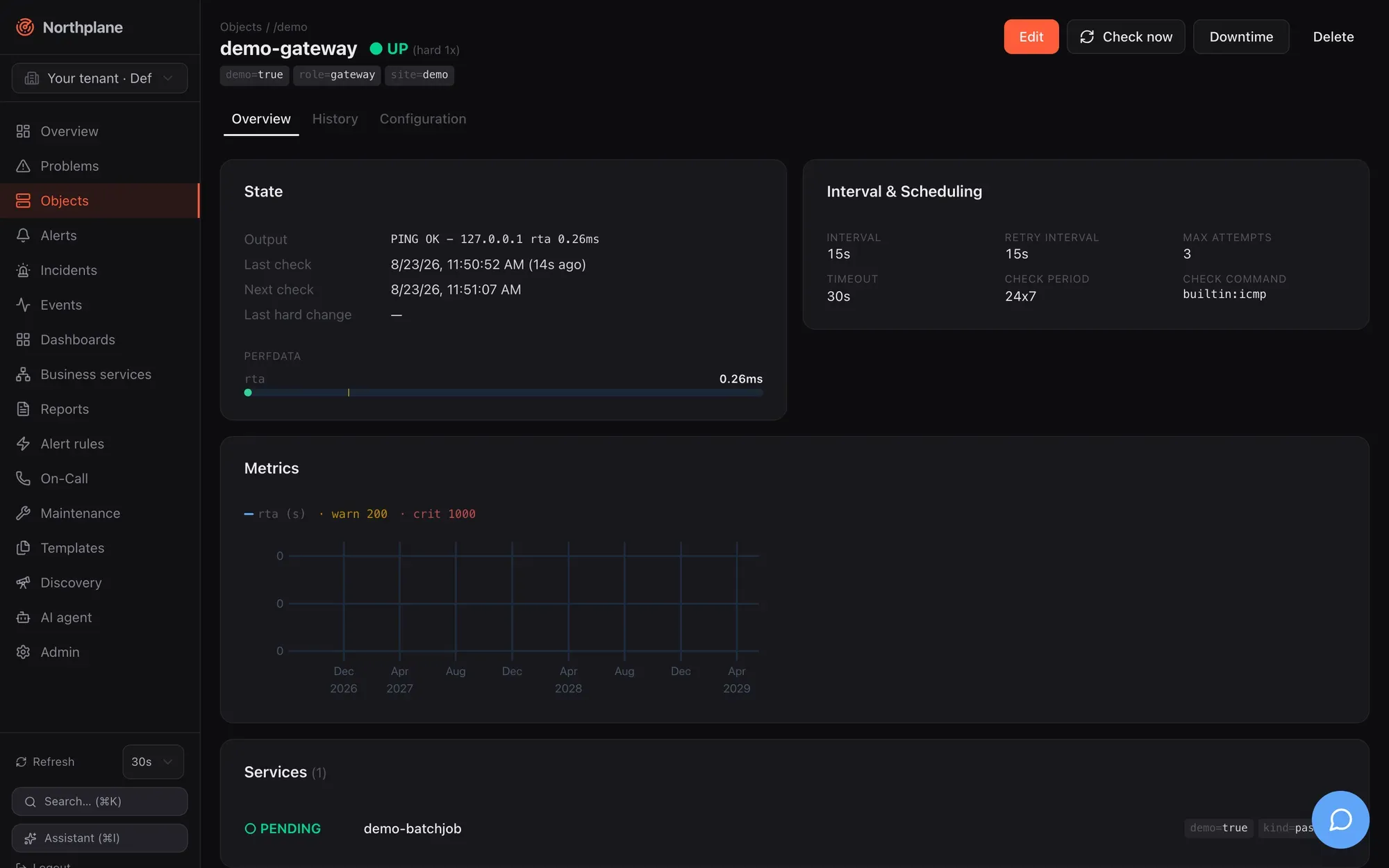
Section titled “Object detail”Route /objects/<id>. Data: GET /api/v1/objects/{id}, GET /api/v1/objects/{id}/effective-config (returns {spec, templateChain}), GET /api/v1/events?objectId=<id>&limit=30, for hosts GET /api/v1/services?hostId=<id>&limit=1000 (for services: the sibling services of the same host), and POST /api/v1/metrics/query with {objectId, from: now-24h, to: now, maxPoints: 300} (refreshed every 60 s; metrics:read). An unknown id shows “404 — This object doesn’t exist or was deleted.” with a Back to objects link.
Header
Section titled “Header”Breadcrumb Objects / folder / host; the name with the state badge (for example CRITICAL (hard 3x)), label chips and — for services — a Host: <name> chip that links to the host. Actions:
| Action (EN / DE) | Call |
|---|---|
| Edit (Bearbeiten) | opens the create/edit dialog |
| Check now (Jetzt prüfen) | POST /api/v1/objects/{id}/check-now (checks:run); the page re-queries after 2.5 s |
| Downtime | the Downtime dialog |
| Delete (Löschen) | DELETE /api/v1/objects/{id} with the cascade warning for hosts; navigates back to the list |
Overview tab (Übersicht)
Section titled “Overview tab (Übersicht)”| Card | Content |
|---|---|
| State (Zustand) | Output (humanised — SNMP sysUpTime ticks become “up 2d 8h”), long output, Last check with age, Next check, Last hard change, acked by/comment when acknowledged, Downtime: active when in a downtime, Flapping: yes when flapping. Below it the Perfdata meters: every label=value;warn;crit;min;max token becomes a labelled bar with amber (warn) and red (crit) markers; counters without bounds are shown as a value only, never as a full bar. |
| Interval & Scheduling | The resolved values from the effective config: interval, retry interval, max attempts, timeout, check period, check command. |
| Metrics (Metriken) | One chart per unit group: series with the same unit are overlaid, monotonic counters are charted as a per-second rate (/s), internal np_* metrics are hidden. Hover for a crosshair tooltip. Warn/crit thresholds from the first series’ perfdata are drawn as translucent bands. Shown only when the object has stored series — see Metrics and NP-TSDB. |
| Services (N) (hosts) / Other services on this host (services) | The host’s services with state badges, each linking to its detail. |
History tab (Historie)
Section titled “History tab (Historie)”The last 30 events of the object (state_change, ack, downtime, notification …) as a timeline: time, type badge, severity/state badge, humanised output. The full event log with filters and export is on the Events page.
Configuration tab (Konfiguration)
Section titled “Configuration tab (Konfiguration)”Effective configuration (Effektive Konfiguration): the spec after template inheritance as a key/value table — empty values are dropped and secret-looking values (--token, --password, --community, API keys) are masked as •••. Below it Template chain (Template-Kette) shows the inheritance order as a → b. The Raw JSON / Table (Tabelle) toggle switches to the exact document returned by GET /api/v1/objects/{id}/effective-config. Per-field origin (which template supplied a value) is not exposed by the API, so the chain is shown as a whole. Inheritance rules are in Object model.
Charts
Section titled “Charts”All metric charts in the UI (object detail, dashboard metric/stat/bar widgets) share one uPlot wrapper: multiple series over a shared time axis, a colour legend above the plot (series name + unit, · warn N, · crit N), threshold bands above the warn (amber) and crit (red) values, a hover crosshair with a floating tooltip, and automatic re-fit when the container is resized. The band source is an explicit widget override if set, otherwise the first series’ Nagios perfdata range. The query behind every chart is POST /api/v1/metrics/query (Metrics and NP-TSDB).