
Reports
A report is a stored definition (type + parameters + optional schedule and recipients). You can render it at any time in HTML, CSV or JSON, run it by hand, or let the built-in scheduler render, archive and e-mail it on a daily, weekly or monthly slot. Reports are config documents (/api/v1/reports), so they travel in bundles like everything else.
Report types
Section titled “Report types”type |
Label (EN / DE) | Rows | Totals | Parameters used |
|---|---|---|---|---|
availability |
Availability / Verfügbarkeit | one row per object matched by selector (max 500): availability (%, 3 decimals) and downtime (minute-rounded); row class ok, warn (below target + half the remaining margin) or crit (below target) |
avgAvailability |
selector, windowDays, target |
sla |
SLA | identical to availability (same renderer, different title) |
avgAvailability |
selector, windowDays, target |
alert-stats |
Alert statistics / Alarm-Statistik | top 20 alert titles by count within the window | alerts (count), mtta (mean open→ack), mttr (mean open→resolve) |
windowDays |
oncall |
On-call / Bereitschaft | <schedule> / <contact> with hours on duty in the window (layers and overrides from the schedule timeline) |
— | windowDays |
audit |
Permissions (Berechtigungen) | one row per role: permissions, idpGroups, includes |
— | — |
Availability is computed from state_change events exactly like the business-service SLA: hard transitions only, the state before the window is assumed OK, an ongoing problem counts up to now, and every hard non-OK state (WARNING and UNKNOWN included) counts as downtime. alert-stats reads at most 1000 alerts opened since the window start.
Definition
Section titled “Definition”| Field | Type | Notes |
|---|---|---|
name |
string | required, unique per tenant |
type |
string | one of the five types; an unknown type fails at render time with 500 |
params.selector |
string | label selector for availability/sla (empty = all objects of the tenant) |
params.windowDays |
int | default 30; the UI offers 1, 7, 30, 90 |
params.target |
number | SLA target in %, default 99.9 |
params.includeDowntimes |
bool | stored, not applied |
params.channel |
string | name of the e-mail channel used for scheduled delivery; empty = first enabled e-mail channel |
schedule |
string | see grammar below; empty = never scheduled |
email |
string[] | recipients for scheduled/manual runs |
keep |
int | archive retention in distinct slots; 0/absent = 12 (the UI dialog proposes 10) |
{ "name": "prod-availability", "type": "availability", "params": {"selector": "env=prod", "windowDays": 30, "target": 99.95, "channel": "ops-mail"}, "schedule": "monthly:1@06:30", "keep": 24}Rendering on demand
Section titled “Rendering on demand”POST /api/v1/reports/{name}:render?format=html|csv|json|pdf (permission reports:render):
format |
Response |
|---|---|
html (default) |
a print-optimised page (labels are German) |
csv |
text/csv, Content-Disposition: attachment; filename="<name>.csv" |
json |
the render model: {"title","type","generatedAt","windowDays","rows":[{"name","values":{…},"class"}],"totals":{…}} |
pdf |
501 np:reports/pdf — PDF needs the optional Chromium renderer sidecar, which is not part of the single binary; render HTML and print it, or deploy the renderer container |
Rendering always uses the stored parameters — query-string overrides are not implemented. Every render is audited (report.render).
NP=https://np.example.comTOK=np_…curl -s -X POST "$NP/api/v1/reports/prod-availability:render?format=json" -H "Authorization: Bearer $TOK" | jq .totalscurl -s -X POST "$NP/api/v1/reports/prod-availability:render?format=csv" -H "Authorization: Bearer $TOK" -o prod-availability.csvReference: post_reports_name_render. The AI tool render_report (see MCP server) returns the same JSON model.
Schedules
Section titled “Schedules”schedule uses a small grammar — not cron, not RRULE:
| Spec | Meaning |
|---|---|
daily |
every day at 07:00 |
daily@HH:MM |
every day at the given time |
weekly:<weekday> |
once per ISO week on that weekday at 07:00; long or three-letter names (monday, mon, … case-insensitive) |
weekly:<weekday>@HH:MM |
as above at the given time |
monthly |
on the 1st of every month at 07:00 |
monthly:<day> |
on day 1–31 (clamped to the month’s length, so 31 fires on 28/29/30 February/April/…) |
monthly:<day>@HH:MM |
as above at the given time |
Times are in the server’s local time zone. An empty schedule means the report is never run automatically; an unparseable schedule is logged once per sweep and skipped (the UI composer always produces a valid spec).
How the scheduler works:
- A sweep runs every minute (the first one ~10 s after start) over every tenant and every scheduled report.
- Each period has a slot key:
2006-01-02for daily,2006-Www(ISO week) for weekly,2006-01for monthly. When the slot’s due time has passed and no archive entry exists for that slot, the report is rendered, archived and e-mailed. A slot is produced at most once — and a missed run (server down at 07:00) is caught up once at the next sweep, not skipped and not repeated. - Archival stores HTML and CSV for the slot. A failed render leaves the slot open and is retried next minute; a failed mail is logged but does not block archival (the slot is done, the mail is not retried).
- Mail goes to every address in
emailwith subject[Northplane] Report <name> <slot>and the HTML as body, through the e-mail channel named inparams.channel(it must exist, be of typeemailand be enabled) or, if unset, the first enabled e-mail channel of the tenant. Without any enabled e-mail channel the run recordsmailError: no enabled e-mail channel configured. Channels are described in Channels.
Running now
Section titled “Running now”POST /api/v1/reports/{name}:run (permission config:write) renders, archives and mails immediately, independent of the schedule. The manual run gets its own slot manual-<UTC timestamp> so it never collides with the scheduled slot’s dedup gate:
curl -s -X POST "$NP/api/v1/reports/prod-availability:run" -H "Authorization: Bearer $TOK"{"report": "prod-availability", "slot": "manual-2026-08-23T10:00:00", "archived": true, "recipients": 2, "sent": 2}mailError appears when delivery failed; archived is still true in that case. Reference: post_reports_name_run.
Archive
Section titled “Archive”| Endpoint | Permission | Result |
|---|---|---|
GET /api/v1/reports/{name}/archive?limit=100 |
objects:read |
newest first: {"items":[{"id","tenantId","reportName","slot","format","createdAt"}]}; a typo in the name is 404, not an empty list |
GET /api/v1/reports/{name}/archive/{id} |
objects:read |
the stored bytes with Content-Disposition: attachment; filename="<name>-<slot>.<html|csv>"; the id must belong to the named report |
Retention counts distinct slots per report: on every insert the archive is pruned to the newest keep slots (default 12), and all formats of a kept slot survive together. Manual runs consume slots like scheduled ones.
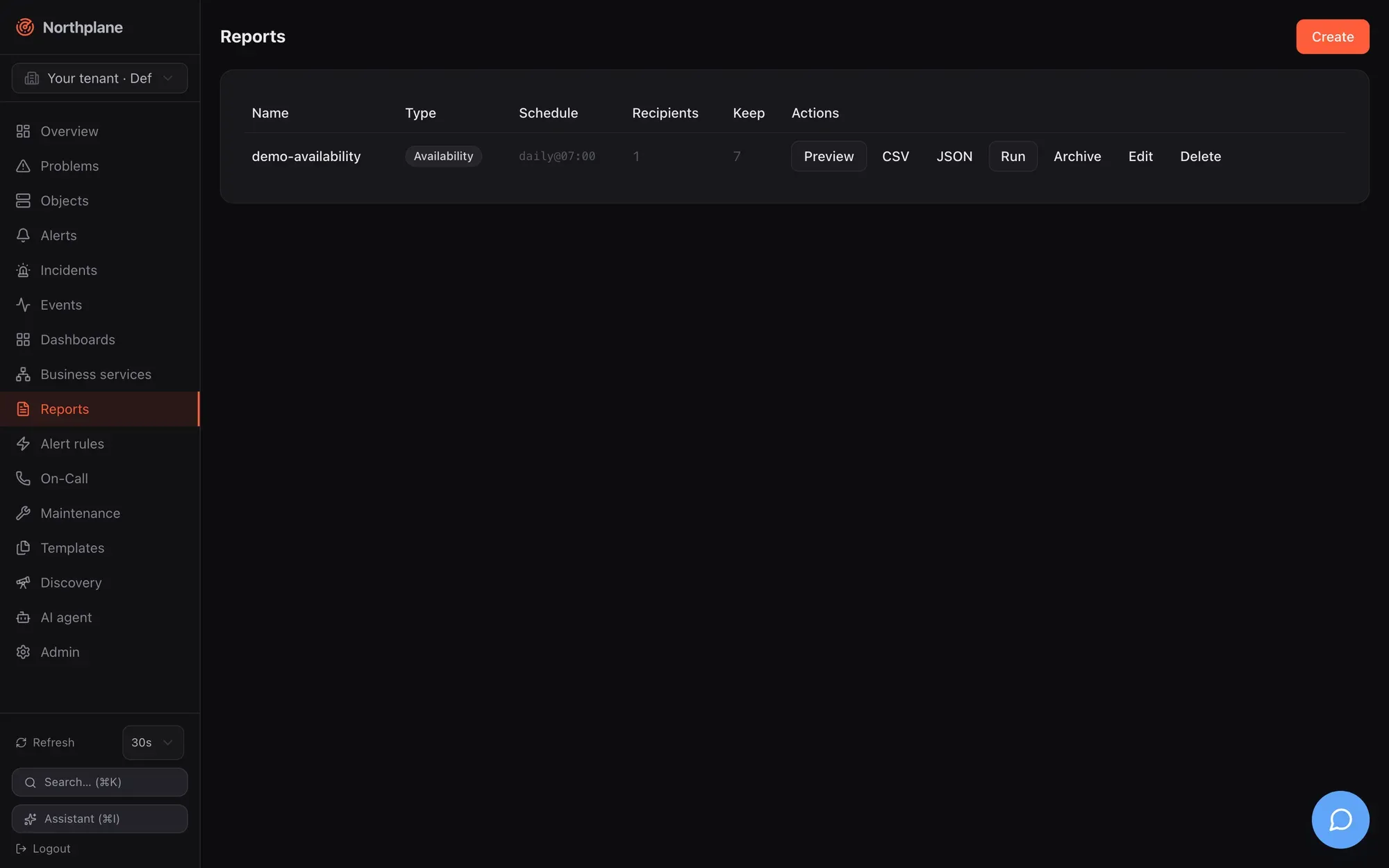
Reports in the sidebar lists every definition: name, type badge, schedule (raw grammar), recipient count — with an amber warning when a schedule is set but no recipients — and keep. Row actions:
| Action | Effect |
|---|---|
| Preview (Vorschau) | :render?format=html shown in a sandboxed iframe, with CSV/JSON download buttons |
| CSV, JSON | download via :render |
| Run (Ausführen) | :run — render + archive + send now |
| Archive (Archiv) | lists the stored slots with download links |
| Edit (Bearbeiten), delete |
The create/edit dialog has Name, Type, Selector (availability/SLA only), Window (24 h / 7 / 30 / 90 days), SLA target % (empty = 99.9), the downtimes checkbox, a schedule composer (frequency none/daily/weekly/monthly, weekday or day of month, time — the resulting grammar is shown live), the recipient list and “Keep archive” (default 10). Saving an edited report re-fetches the document for a fresh ETag.
Permissions
Section titled “Permissions”| Action | Permission |
|---|---|
| list/read definitions, list/download archive | objects:read |
create/update/delete definitions, :run |
config:write |
:render (preview, CSV, JSON) |
reports:render |
Bundles and demo data
Section titled “Bundles and demo data”Bundle kind Report (see Config bundles):
kind: Reportmetadata: {name: prod-availability}spec: type: availability params: {selector: env=prod, windowDays: 30, target: 99.95, channel: ops-mail} schedule: monthly:1@06:30 keep: 24Demo mode seeds demo-availability (availability over demo=true, 30 days, daily@07:00, one recipient, keep 7) — note that it only mails when an enabled e-mail channel can actually deliver.