
Config bundles
A bundle is a multi-document YAML file that describes configuration declaratively: hosts, services, templates, check commands, contacts, channels, escalation policies, alert rules, dashboards, reports and more. The server diffs a bundle against its current state (plan), applies it idempotently (apply) and can render its whole configuration back as a bundle (export). The same format and the same applier are used by np apply, the Admin → Config bundles (Config-Bundles) tab, the AI config tools, the Nagios importer and federation.
Bundles are the GitOps vehicle of Northplane: keep them in a repository, review plans, apply on merge.
Format
Section titled “Format”kind: <Kind> # required; one of the kinds belowmetadata: name: <string> # required; must not contain newline or tab characters host: <host name> # Service only (required for Service) folder: /path # Host/Service only labels: {k: v} # Host/Service: object labels; other kinds: the document's "labels" fieldspec: {...} # the body (ObjectSpec for Host/Service; the resource document fields otherwise)data: {...} # optional non-spec payload (dashboard layouts, report params); merged with spec---kind: <next document>- Documents are separated by
---; empty documents (only separators/comments) are skipped. There is noapiVersionfield. - Parse errors name the document:
bundle: document 3: unknown kind "Hosts",bundle: document 2 (Service): missing metadata.name. - Identity inside a bundle is
Kind/name, orService/<host>/<name>for services; duplicates are rejected (duplicate Host/web-01). A Service withoutmetadata.hostis rejected (service requires metadata.host). - Structural errors come back as
422 np:validation/bundlewith all messages joined by;. - The body may be JSON — JSON is valid YAML.
Kinds and apply order
Section titled “Kinds and apply order”Documents are applied in this fixed order (dependencies before dependents); export sorts the same way, then by host, then by name:
Tenant, Role, TimePeriod, CheckCommand, Template, Contact, ContactGroup, Channel,Schedule, IVRMenu, EscalationPolicy, EventSource, AlertGroup, AlertRule,Host, Service, BusinessService, Heartbeat, Dashboard, Report, StaticGroup,WebhookSubscription, SavedFilter| Kind | Stored as | Applied | Exported | Notes |
|---|---|---|---|---|
Host, Service |
objects table | yes | yes | metadata.folder, metadata.labels, spec = ObjectSpec; services resolve metadata.host by host name |
Template, CheckCommand, TimePeriod |
resource documents | yes | yes | see Templates |
Contact, ContactGroup, Schedule |
resource documents | yes | yes | ContactGroup.members and schedule participants are contact ids |
Channel, EscalationPolicy, AlertRule, AlertGroup, EventSource, IVRMenu |
resource documents | yes | yes | validated like the REST API (channel type required, rule compiles, policy has ≥ 1 step) |
BusinessService, Dashboard, Report, WebhookSubscription, SavedFilter, StaticGroup |
resource documents | yes | yes | Dashboard.spec is the opaque UI widget document |
Role |
resource documents | yes | no | roles export via admin tooling only; apply works |
Tenant |
— | no | no | in the vocabulary, but the applier has no handler: plan warns unsupported kind Tenant, apply skips it silently. Create tenants via POST /api/v1/tenants. |
Heartbeat |
— | no | no | same — plan warns unsupported kind Heartbeat; manage heartbeats via the heartbeats API |
Not bundle kinds at all: sites, schedule overrides, users, API tokens, secrets, preferences, branding, downtimes, silences. Secrets are referenced from bundles as $SECRET:name$ and created separately (Secrets).
Plan, apply, export
Section titled “Plan, apply, export”All endpoints act on the request tenant (X-Northplane-Tenant for holders of admin:tenants, otherwise the caller’s tenant). The request body is read raw — the server does not inspect Content-Type — up to 8 MiB (413 np:bundle/size).
| Endpoint | Permission | Behaviour |
|---|---|---|
POST /api/v1/config/bundles:plan [?prune=true&selector=…] |
objects:read |
Dry run. Returns {plan:[{action, kind, name, host?, diff?}], warnings:[…], applyToken?}. When the plan is non-empty an applyToken (ap_ + 32 hex) is cached in memory for 10 minutes, bound to the tenant, single use. |
POST /api/v1/config/bundles:apply?dryRun=true |
config:write |
Same as plan. |
POST /api/v1/config/bundles:apply?applyToken=ap_… |
config:write |
Applies exactly the planned documents (the cached plan). Unknown, expired or foreign-tenant token → 409 np:bundle/token (“re-plan”). |
POST /api/v1/config/bundles:apply [?prune=true&selector=…] |
config:write |
Direct apply of the posted bundle (plan + apply in one call). |
GET /api/v1/config/bundles:export [?folder=/x] |
objects:read |
Canonical YAML (Content-Type: application/yaml). With folder, only Host/Service documents of that subtree are rendered (global resources are skipped). |
prune=true deletes every currently exported document whose identity is not in the bundle; selector restricts pruning to documents whose metadata.labels match the label selector. Prune failures do not abort the apply — they are reported as warnings.
The response of an apply is a PlanResult whose plan lists what was actually applied (create/update/delete), plus warnings.
How the plan is computed
Section titled “How the plan is computed”- Host/Service: an object that does not exist is
create. Otherwisefolder,labelsand everyspec.<field>are compared (JSON projection); differing fields appear indiffas{"field": [old, new]}. A Service whose host does not exist yet is planned ascreate— the host may be created earlier in the same bundle. - Resource documents: missing →
create; otherwise a field-wise diff ofspec ∪ data ∪ {labels}against the stored document (envelope fieldsid,tenantId,version,createdAt,updatedAt,nameignored). Fields absent from the bundle are unmanaged — they are never diffed. - The plan is sorted create → update → delete. Unsupported kinds produce a warning and no action.
How apply works
Section titled “How apply works”- The bundle is parsed and validated, and a plan is computed (
422 np:validation/bundleon errors). - Documents are sorted by kind order and applied one by one: objects through the same
validateSpecas the REST API (templates must resolve,notifyOntokens valid, contacts/contact groups must exist); resource documents throughvalidateResourceDoc. Creates use create-only semantics, updates are unconditional (noIf-Match). Ids are preserved on update; a new document gets a fresh UUIDv7 unless its body carries anid. - Apply is not transactional: the first failure stops the run with
422 np:bundle/apply(“apply failed at Kind/name”, the cause indetail) and an audit entrybundle.applylisting what was already applied. Earlier documents stay applied; fix the bundle and re-run — the re-run is idempotent. - Prune deletions run after all documents.
- An audit entry
bundle.applyis written, the catalog is reloaded and alert rules are recompiled, and the response lists the applied actions.
Re-applying an unchanged bundle yields an empty plan (np apply prints no changes) — bundles are safe to apply on every CI run.
Using the np CLI
Section titled “Using the np CLI”export NP_SERVER=https://monitoring.example.net NP_TOKEN=np_…
np apply -f bundle.yaml --dry-run # plan onlynp apply -f bundle.yaml # applynp apply -f bundle.yaml --prune # apply and delete everything not in the bundlecat bundle.yaml | np apply -f - # read the bundle from stdinnp export > bundle.yaml # canonical export of the tenantnp apply posts to …/bundles:apply (with dryRun=true and/or prune=true) as application/yaml and prints one line per action — applied create Host/web-01, would apply update Service/web-01/http, warning: unsupported kind Heartbeat — or no changes. With --json the raw PlanResult is printed. The CLI has no --selector option for selective pruning; use the HTTP API for that. Permissions: config:write for apply, objects:read for dry-run and export. Full reference: np CLI.
Admin → Config bundles tab
Section titled “Admin → Config bundles tab”Admin → Config bundles (Config-Bundles) offers the two operations without a CLI:
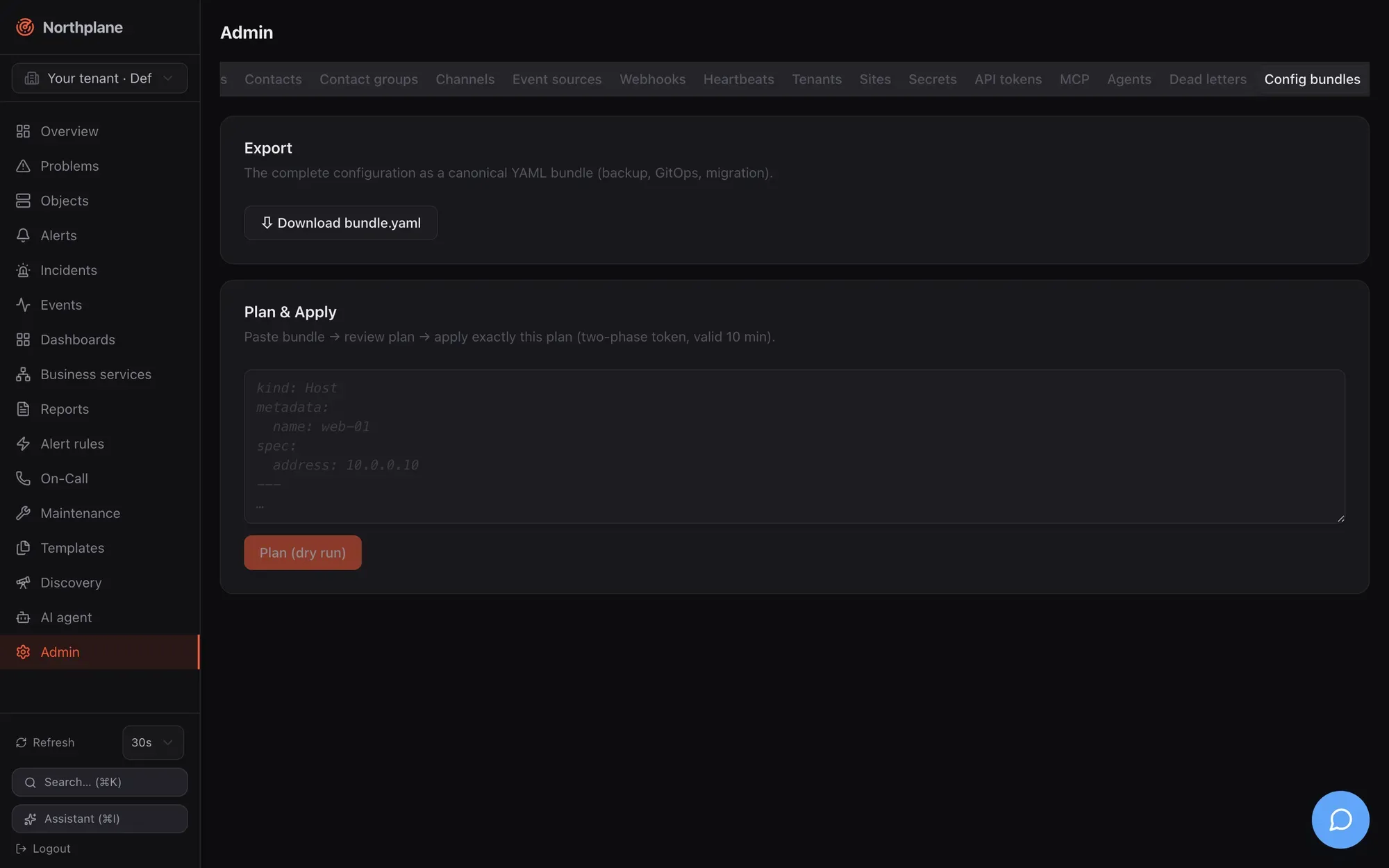
- Export — a download link for
northplane-bundle.yaml(GET /api/v1/config/bundles:export): the complete configuration for backup, GitOps or migration. - Plan & Apply — paste a bundle, click Plan (dry run), review the table of actions (badges
create/update/delete, kind, name, diff), then Apply — which sends theapplyTokenfrom the plan, so exactly the reviewed plan is executed (two-phase token, valid 10 minutes). “No changes — configuration is identical” means the bundle matches. The tab does not exposeprune.
A complete example
Section titled “A complete example”kind: TimePeriodmetadata: {name: business-hours}spec: days: monday: ["09:00-17:00"] tuesday: ["09:00-17:00"] wednesday: ["09:00-17:00"] thursday: ["09:00-17:00"] friday: ["09:00-17:00"]---kind: Templatemetadata: {name: linux-base}spec: kind: host interval: 30s maxCheckAttempts: 2---kind: Contactmetadata: {name: ops-alice}spec: phone: "+431234567" timeZone: Europe/Vienna preferences: - {profile: default, channels: [email]}---kind: ContactGroupmetadata: {name: ops}spec: members: ["<contact id of ops-alice>"]---kind: Channelmetadata: {name: ops-mail}spec: type: email enabled: true config: provider: smtp host: mail.internal port: "587" username: northplane password: "$SECRET:smtp-pass$"---kind: EscalationPolicymetadata: {name: default}spec: steps: - {after: 0s, notify: {contactGroup: ops}, channels: [email]} - {after: 15m, unlessAcked: true, notify: {contact: ops-alice}, channels: [sms]}---kind: AlertRulemetadata: {name: critical}spec: match: 'event.type == "state_change" && event.stateType == "hard" && (event.state == "CRITICAL" || event.state == "DOWN")' severity: critical escalationPolicy: default---kind: Hostmetadata: name: db-01 folder: /prod labels: {env: prod, role: db}spec: address: 10.0.0.5 checkCommand: builtin:icmp templates: [linux-base]---kind: Servicemetadata: name: postgres host: db-01 labels: {env: prod}spec: checkCommand: builtin:tcp args: ["5432"] interval: 30s contactGroups: [ops]---kind: Dashboardmetadata: {name: wallboard}spec: shared: truedata: spec: time: 24h refresh: 30s widgets: - {type: counters, w: 12, h: 2} - {type: problems, title: Open problems, selector: "env=prod", limit: 20, w: 12, h: 6}Apply it, then verify:
np apply -f bundle.yaml --dry-runnp apply -f bundle.yamlnp apply -f bundle.yaml # → no changesThe channel’s $SECRET:smtp-pass$ reference requires PUT /api/v1/secrets/smtp-pass beforehand (Secrets); channel config keys per type are in Channels.
GitOps workflow
Section titled “GitOps workflow”np export > bundle.yamlonce to capture the current state (includes the demo data if the instance was seeded — remove what you do not want to manage).- Commit; edit in pull requests.
- CI:
np apply -f bundle.yaml --dry-runon pull requests (token withobjects:read),np apply -f bundle.yamlon merge (token withconfig:write). Add--pruneonly when the repository is the complete source of truth for the tenant — prune deletes every exported document not in the bundle, including dashboards and reports users created in the UI. - Use a tenant-scoped token and the
X-Northplane-Tenantheader (or one token per tenant) for multi-tenant set-ups — a bundle is always applied into one tenant.
Export pages through the full inventory (5 000 objects / 2 000 resource documents per page) — exports are complete regardless of tenant size.
Federation
Section titled “Federation”A Site document’s bundle field is a bundle: the main instance validates it on save, and each edge pulls it (GET /api/v1/sites/{name}:pull, conditional on the ETag) and applies it into its own default tenant with the same applier — without prune, retrying every tick until a revision applies. An empty bundle means “nothing managed centrally yet”. See Federation and Tenants and sites.
Other consumers of the format
Section titled “Other consumers of the format”northplaned import nagios --path /etc/nagios [--out northplane-import.yaml]converts a Nagios/Icinga 1 configuration into a bundle (hosts, services, templates, commands, time periods, contacts, static groups) plus a deviation report; review, thennp apply -f northplane-import.yaml. See Plugins and Nagios.- The AI tools
propose_config_change/apply_config_changeplan and apply bundles through the approval flow. See Agent chat.