
Templates, check commands and time periods
Templates hold reusable fragments of an object spec — check command, intervals, thresholds, notification settings, custom variables — that hosts and services inherit by name. Named check commands turn a plugin invocation into a reusable catalog entry, and time periods are referenced from templates and objects as check or notification periods. All three are config documents, edited on the Templates page, through the API, or in bundles, and every change is applied to all objects immediately.
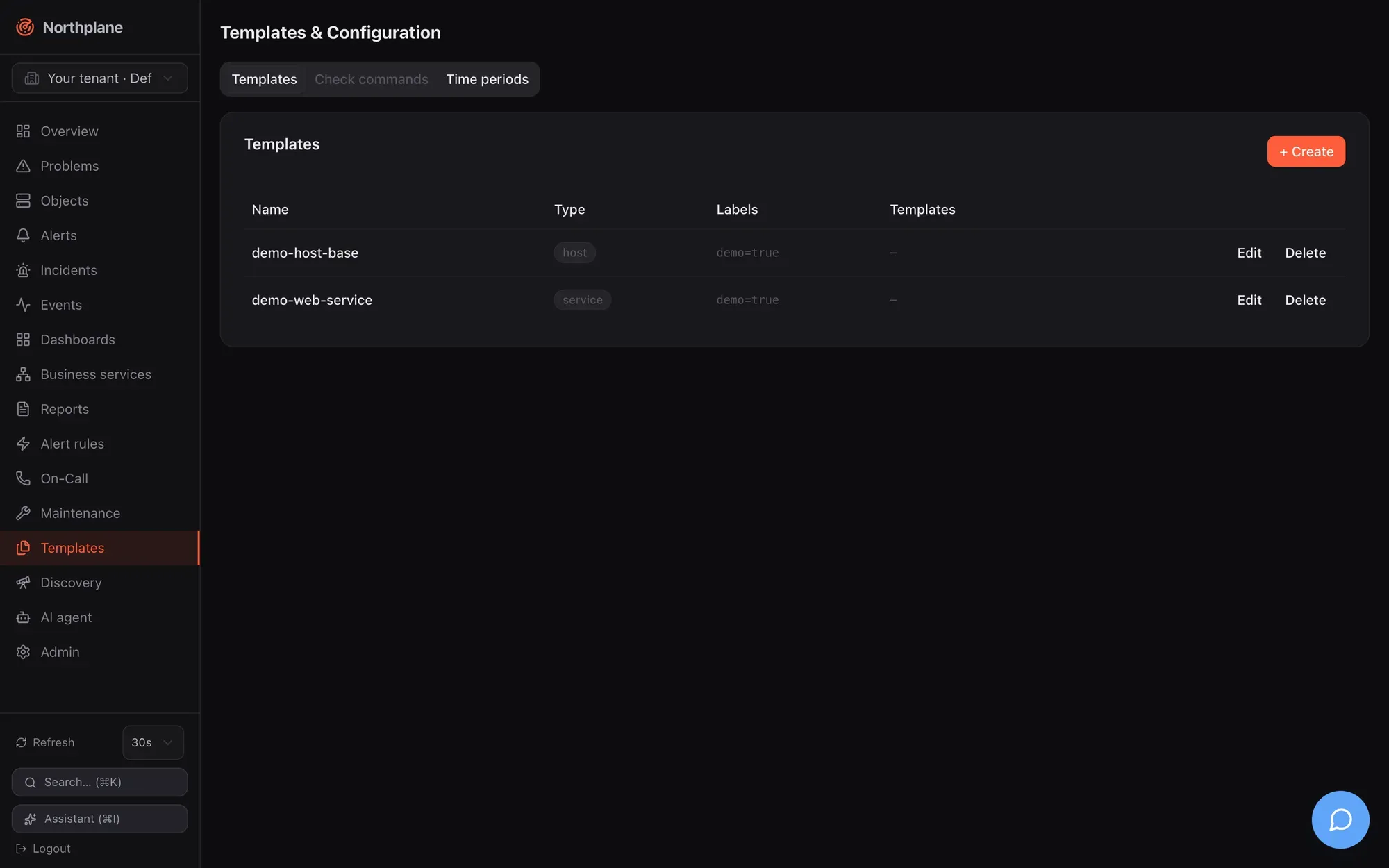
Templates
Section titled “Templates”The resource
Section titled “The resource”| Field | Type | Notes |
|---|---|---|
name |
string | referenced from spec.templates of objects and other templates |
kind |
host | service | command |
informational scope; the UI offers both (empty), host, service. Not enforced — a host template can be attached to a service |
labels |
map | shown in the list; not merged into objects (see below) |
spec |
ObjectSpec | the inheritable fragment — any field of an object spec, including templates to inherit from further templates |
The spec fields and their defaults are listed in Object model; everything an object can carry, a template can carry.
Inheritance and the effective spec
Section titled “Inheritance and the effective spec”When an object is saved or the catalog is loaded, Northplane resolves the effective spec:
defaults ⊕ templates (in declared order, each after its own parents) ⊕ the object's own specRules:
spec.templateslists template names. They are applied in that order: a later entry overrides an earlier one.- A template may itself list
templates; those parents are applied before the template, so the template overrides its parents. - The object’s own spec overrides every template;
SpecDefaults(interval 60 s, retry 15 s, 3 attempts, timeout 30 s, check period24x7, flap thresholds 25/50 %,thresholdMode static) fill whatever is still unset. - Merge semantics per field: scalars and
*boolswitches replace the inherited value when set (enableNotifications: falsein a child wins);varsare merged key by key;templates,parents,args,contacts,contactGroupsandnotifyOnare replaced wholesale — a child that setsargsloses the parent’sargs. - An unset field means “inherit”. You cannot reset a field to its default by writing an empty value; write the default explicitly instead.
- Every template may occur only once in the whole chain: cycles and diamonds (the same template reachable via two paths) are rejected with
template cycle or duplicate via "<name>"; an unknown name isunknown template "<name>". Both are422when you save the object.
The resolved result is what the scheduler, executor and notification routing use. Inspect it with GET /api/v1/objects/{id}/effective-config → {"spec": {…}, "templateChain": ["…"]} (get_objects_id_effective_config), on the object’s Configuration tab in the UI (“Effective configuration” table plus the chain a → b, with a raw-JSON toggle), or with np describe <object-id>. templateChain lists the templates in resolution order — each template followed by the templates it inherits from.
Worked example:
kind: Templatemetadata: {name: base}spec: kind: host spec: checkCommand: builtin:icmp interval: 60s maxCheckAttempts: 3 vars: {owner: ops}---kind: Templatemetadata: {name: prod-host}spec: kind: host spec: templates: [base] interval: 30s contactGroups: [ops] notificationPeriod: office vars: {env: prod}---kind: Hostmetadata: name: db-01 folder: /prod labels: {env: prod, role: db}spec: address: 10.0.0.5 templates: [prod-host] vars: {owner: dba}Effective spec of db-01: checkCommand: builtin:icmp and maxCheckAttempts: 3 from base, interval: 30s, contactGroups: [ops] and notificationPeriod: office from prod-host, vars: {owner: dba, env: prod} (key-wise merge, the object wins on owner), address from the object, retryInterval: 15s and timeout: 30s from the defaults; templateChain: ["prod-host", "base"].
Editing templates
Section titled “Editing templates”Templates → Templates tab lists name, type (host/service/both), labels and parent templates; the dialog offers Name, Type, Labels and the full object form (Address, Check, Interval, Notifications, Advanced) — the same fields as the host/service dialog described in Hosts and services. Objects pick templates in their Templates field.
API: generic CRUD at /api/v1/templates (objects:read / config:write, If-Match on PUT). Saving, updating or deleting a template reloads the tenant’s catalog and reschedules every object — the new values take effect with the next check; no object needs to be re-saved.
Check commands
Section titled “Check commands”A check command is a stored, named invocation. Objects reference it by its bare name in checkCommand (anything that is not passive, builtin:…, exec:… or agent:… is looked up as a check command).
| Field | Type | Notes |
|---|---|---|
name |
string | the reference used in checkCommand |
type |
exec | builtin | agent | passive |
execution class |
line |
string[] | argv; exec: line[0] is the plugin (resolved in the plugins directory unless absolute), the rest its arguments; builtin: line[0] is the builtin name, the rest its flags; agent: the command np-agent runs |
env |
bool | export NAGIOS_* / NORTHPLANE_* environment macros to exec plugins |
timeout |
duration | stored, but not used — the executor applies the object’s effective timeout (default 30 s) |
How the object’s args relate to a named command: for builtin: and exec: references written directly on the object, args are appended to the command. For a named exec/agent command, line is used as-is and the object’s args are not appended; they are available only as $ARG1$…$ARG32$ macros inside line. $SECRET:name$, $USER1$ (plugins dir), $HOSTADDRESS$, $_HOSTVAR$/$_SERVICEVAR$ and the other macros are expanded per element without a shell — see Plugins and Nagios compatibility for the macro table and the output grammar.
kind: CheckCommandmetadata: {name: check_http_vhost}spec: type: exec line: ["$USER1$/check_http", "-H", "$HOSTADDRESS$", "-u", "$ARG1$", "-w", "$ARG2$", "-c", "$ARG3$"] env: false---kind: Servicemetadata: {name: shop-frontpage, host: web-01}spec: checkCommand: check_http_vhost args: ["/", "1", "3"]The catalog of commands consists of the stored check commands (GET /api/v1/check-commands) and the builtins (GET /api/v1/check-commands:builtins → agent cert dns http http-flow https icmp imap nrpe ntp ping smtp snmp snmp-walk ssh-banner tcp tls-cert, documented in Builtin checks). POST /api/v1/check-commands:test (checks:run) runs a builtin against an address with flags and returns state, label, output, perfdata, tookMs without touching any object — use it to validate flags before creating a template. The Nagios importer creates CheckCommand documents from command definitions (Plugins and Nagios compatibility).
Templates → Check commands (Check-Kommandos) tab: name, type, command line, env, timeout; dialog with Name, Type, Command line (list editor), Timeout and the “Export env macros” switch. API: /api/v1/check-commands (generic CRUD, objects:read / config:write).
Time periods
Section titled “Time periods”Time periods are the third tab, Templates → Time periods (Zeiträume): name, alias, per-weekday ranges (comma-separated, e.g. 08:00-17:00, 18:00-20:00), exceptions and an exclusion list. Their format, the 24x7 default and the time-zone semantics are documented in Maintenance → Time periods.
In templates and objects they are referenced by name from two fields:
| Field | Used by |
|---|---|
notificationPeriod |
direct object notifications (contacts/contactGroups): a hard state change outside the period sends nothing; evaluated in UTC |
checkPeriod |
resolved into the effective config (default 24x7) and enforced: scheduled runs and freshness probes outside the period are skipped; a manual check-now always runs |
Contacts and on-call schedules reference time periods as well (channel preferences, rotation restrictions); see Contacts and on-call.
Bundles
Section titled “Bundles”All three kinds are bundle kinds and are applied before hosts and services (KindOrder: TimePeriod, CheckCommand, Template, …, Host, Service), so one bundle can carry the whole hierarchy. CheckCommand and TimePeriod documents are flat (spec: holds type/line/… or days/exceptions/…); Template documents nest the object spec under spec.spec as shown above. np export writes all of them; np apply --dry-run shows the planned diff. Details: Config bundles.
Demo mode seeds two templates to look at: demo-host-base (host: 30 s interval, 10 s retry, 2 attempts, 10 s timeout) and demo-web-service (service: 60 s, 10 s timeout).
Permissions
Section titled “Permissions”| Action | Permission |
|---|---|
| read templates, check commands, time periods | objects:read |
| create / update / delete them | config:write |
check-commands:test |
checks:run |
| read an object’s effective config | objects:read |
Among the built-in roles only admin has config:write; an operator can attach existing templates to objects but not edit templates.